Don't miss your chance to take the Fabric Data Engineer (DP-600) exam for FREE! Find out how by watching the DP-600 session on-demand now through April 28th.
Learn moreJoin the FabCon + SQLCon recap series. Up next: Power BI, Real-Time Intelligence, IQ and AI, and Data Factory take center stage. All sessions are available on-demand after the live show. Register now
Hi,
I want to keep a;ignment for few row headers as Center and for Few row headers as Left.
Couls you please let me know how to achieve this?
Thanks,
Sam
Solved! Go to Solution.
@Anonymous , The option I can see in the table is align all columns together not for each one.
Hi Guys,
Is there any formula to change the alignment for few row headers as Center and for Few row headers as Left?
Kindly guide.
Thanks.
Hi @mon ,
In this case you would need to do the new coluns with the variations you would need something similar to this:
Cat Alignment =
SWITCH ('Table'[cat] ,
"A",REPT( UNICHAR(8192),10) & 'Table'[cat],
"B", 'Table'[cat],
"C",REPT( UNICHAR(8192),10) & 'Table'[cat])
This would give you different spacings for each value. On the settings you cannot set up a row value at a time.
For columns you have that option since you can setup each of the columns separatly.
Regards
Miguel Félix
Proud to be a Super User!
Check out my blog: Power BI em PortuguêsHi @Anonymous ,
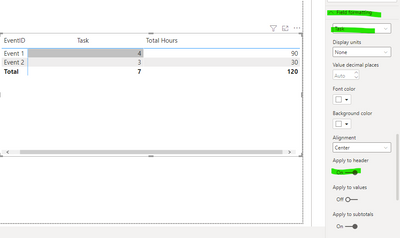
On the matrix options go to Field formatting and then select the alignment apply to header option must be active:
You can format each column individually.
Regards
Miguel Félix
Proud to be a Super User!
Check out my blog: Power BI em Português@MFelix ,
Thanks, but its only available for columns from 'Value' section. I wanted to modify alignment from 'Row Hedear ' section columns. I think it's not available it in Power bi. Either we can do it same for ALL columns from row header section. It's not giving option toodify it individually.
Hi @Anonymous ,
You are correct I missread the title, one option can be to create a new column with the following code:
Giving the sense of center alignment, you can optimize this by change the number of repts by a dinamic number.
Regards
Miguel Félix
Proud to be a Super User!
Check out my blog: Power BI em PortuguêsCheck out the April 2026 Power BI update to learn about new features.
If you have recently started exploring Fabric, we'd love to hear how it's going. Your feedback can help with product improvements.
A new Power BI DataViz World Championship is coming this June! Don't miss out on submitting your entry.
| User | Count |
|---|---|
| 48 | |
| 40 | |
| 38 | |
| 20 | |
| 17 |
| User | Count |
|---|---|
| 68 | |
| 66 | |
| 30 | |
| 26 | |
| 25 |