cancel
Showing results for 
Search instead for 
Did you mean: 

A new Data Days event is coming soon! This time we’re going bigger than ever. Fabric, Power BI, SQL, AI and more. Don't miss out.

Reply
rocco_guidetti
Advocate I
Advocate I

Matrix - Measure Row Total

Dear All,


I am struggling to find the right way to compute a row total for the matrix table at the bottom.


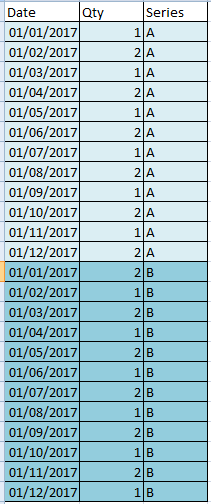
My dataset has a structure similar to the one below:

 datasetdataset 

While these are the measures that I am using to compute the monthly quantities for each series and the absolute difference to be visualized in the matrix:


Series A = SUMX(FILTER(Sheet1;Sheet1[Series]="A");Sheet1[Qty])

Series B = SUMX(FILTER(Sheet1;Sheet1[Series]="B");Sheet1[Qty])

Absolute difference = abs([Series B]-[Series A])


As you can see I would like to highlight the monthly absolute difference among the two series and the total of the absolute difference column. Correclty the DAX returns 0 for that row total but I would appreciate any suggestion to compute, maybe with another measure, the total of the absolute deviation (12 in this case).


what I am trying to achievewhat I am trying to achieve


Thank you for your help,

Rocco.


1 ACCEPTED SOLUTION

Hi Sean,


I have found a way around to solve my issue. I am using quite a long formula but it works now.


I am using VAR and RETURN to compute the same calculation for each month and then I compute the sum of all the results.


Your formula was not solving my issue but probably because I framed the question not 100% clearly.


Thanks a lot anyways,

Rocco.

View solution in original post

3 REPLIES 3
Sean
Community Champion
Community Champion

Absolute Difference =
IF (
    ISFILTERED ( Sheet1[Date - Month] ),
    ABS ( [Series B] - [Series A] ),
    DISTINCTCOUNT ( Sheet1[Date - Month] )
)

Hi Sean,


I have found a way around to solve my issue. I am using quite a long formula but it works now.


I am using VAR and RETURN to compute the same calculation for each month and then I compute the sum of all the results.


Your formula was not solving my issue but probably because I framed the question not 100% clearly.


Thanks a lot anyways,

Rocco.

Anonymous
Not applicable

Hi Rocco,


I am sort of stuck with the same problem, do you mind sharing your solution to the problem ? 


Regards,

Rushyendra C

Helpful resources

Announcements
May Power BI Update Carousel

Power BI Monthly Update - May 2026

Check out the May 2026 Power BI update to learn about new features.

Fabric SQL PBI Data Days

Data Days 2026 coming soon!

Sign up to receive a private message when registration opens and key events begin.

New to Fabric survey Carousel

New to Fabric Survey

If you have recently started exploring Fabric, we'd love to hear how it's going. Your feedback can help with product improvements.

Power BI DataViz World Championships carousel

Power BI DataViz World Championships - June 2026

A new Power BI DataViz World Championship is coming this June! Don't miss out on submitting your entry.