
This time we’re going bigger than ever. Fabric, Power BI, SQL, AI and more. We're covering it all. You won't want to miss it.
Learn moreDid you hear? There's a new SQL AI Developer certification (DP-800). Start preparing now and be one of the first to get certified. Register now
I am currently having an issue when adding a field to the Columns of a Matrix table.
I have simiplified the results down to see if anyone can help.
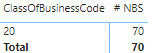
Table 1 - FactPolicyTransactions [FPT] gives me a Total of 70 Sales based on a DistinctCount of Policy.
ClassOfBusinessCode is also taken from the [FPT]
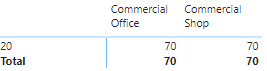
Table 2 - contains the Class of Use from the Logical.SummaryCovernetCombined table and when added to the matrix it shows as:
The correct split should be :
Commercial Office 28
Commercial Shop 42
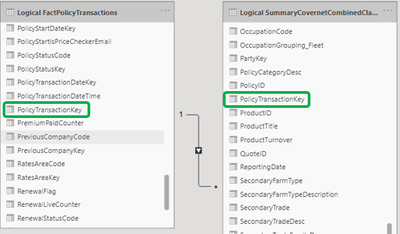
There is a 1:* join between the tables based on PolicyTransactionKey
Any help or pointers greatly appreciated 😇
Solved! Go to Solution.
@Wardy Can you try making the cardinality to bidirectional seems like you are trying to filter table (2) with table(1) attributes which is why it is giving wrong result
Regards,
Husna
Hi @Wardy ,
How abut this?
Measure =
CALCULATE(
DISTINCTCOUNTNOBLANK('Table'[Column]),
ALL('Table')
)
If it's not work, please provide sample data.
Best regards,
Lionel Chen
If this post helps, then please consider Accept it as the solution to help the other members find it more quickly.
@v-lionel-msft thanks for taking the time to look at this. Happy to say I now have this issue resolved. 😁
@Wardy Can you try making the cardinality to bidirectional seems like you are trying to filter table (2) with table(1) attributes which is why it is giving wrong result
Regards,
Husna
Thanks @Anonymous for this solution it resolved my issue. 👏👏
Check out the April 2026 Power BI update to learn about new features.
Sign up to receive a private message when registration opens and key events begin.
If you have recently started exploring Fabric, we'd love to hear how it's going. Your feedback can help with product improvements.
| User | Count |
|---|---|
| 36 | |
| 33 | |
| 31 | |
| 21 | |
| 16 |
| User | Count |
|---|---|
| 66 | |
| 55 | |
| 31 | |
| 24 | |
| 23 |