We've captured the moments from FabCon & SQLCon that everyone is talking about, and we are bringing them to the community, live and on-demand. Starts on April 14th. Register now
Hi I have a Matrix Visual in power BI as follows
| RGY | November | December |
| Green | 280.516064 | 229.5032663 |
| Red | 59.28986904 | 378.0103653 |
| Yellow | 53.54121154 | 20.87497543 |
In Visualization Pane Rows=RGY, Columns=MonthName, Values=ProductQty
I need to show it as If RGY=Green then entire Row should be green,if red then entire row should be Red and so on..
Is this possible,if so Can someone please explain.
Thanks..
Solved! Go to Solution.
Regards
Miguel Félix
Proud to be a Super User!
Check out my blog: Power BI em PortuguêsHi @Anonymous,
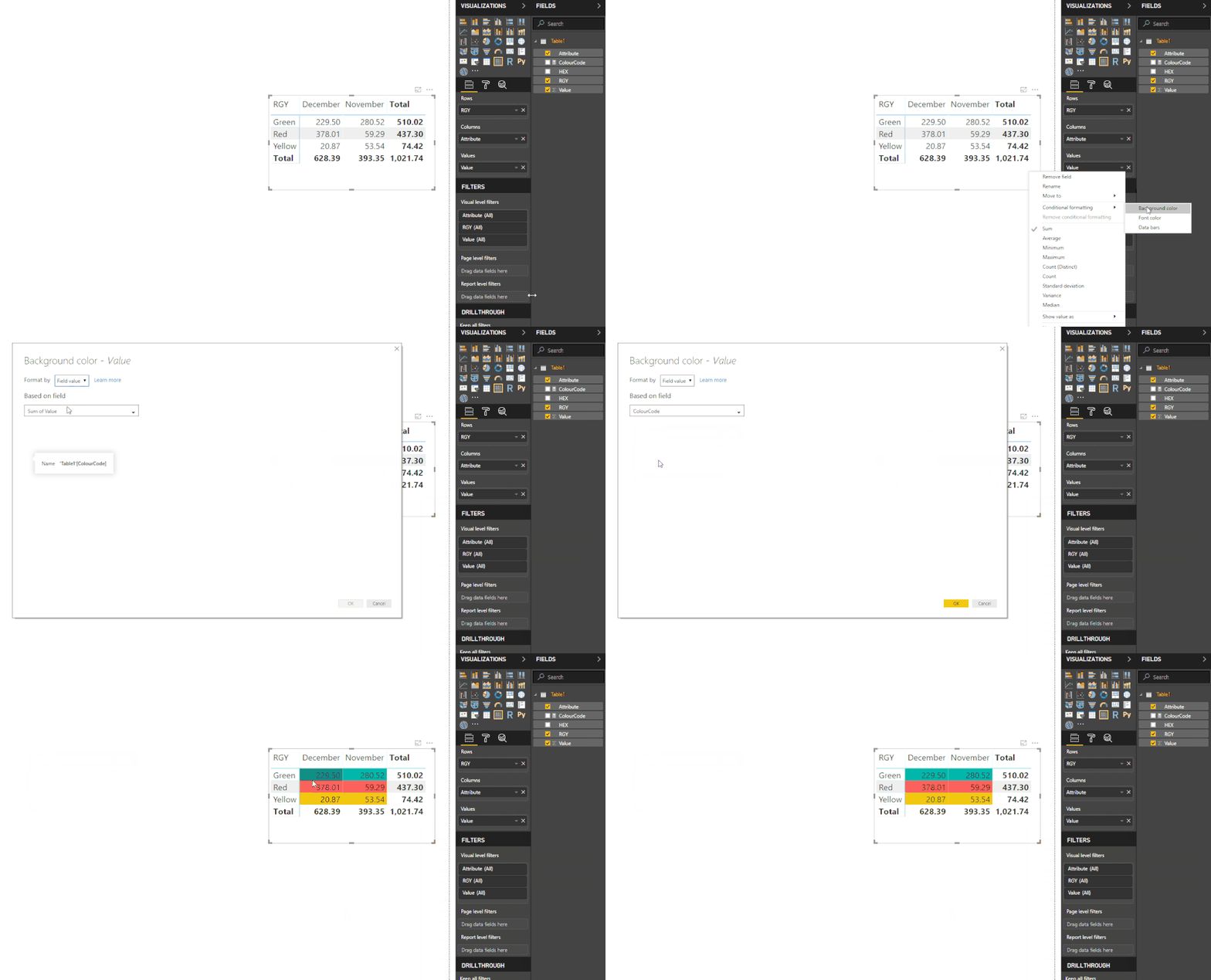
Currently in PBI matrix and tables it's possible to connect a colour field to the condittional formatting in this way you can define the colour on your database and then return that to the matrix visualization however this will only apply to the data not to the headers of the rows or totals.
You need to do the following:
ColourCode = SWITCH(SELECTEDVALUE(Table1[RGY]);
"Green"; "#01B8AA";
"Red"; "#FD625E";
"Yellow"; "#F2C80F")
You can change the color codes by the ones you want you just need to keep the # before the codes.
Check the detail and explanation of this feature in the link.
Regards
MFelix
Regards
Miguel Félix
Proud to be a Super User!
Check out my blog: Power BI em PortuguêsHi MFelix,
Thank you.It worked for me.I downloaded latest version of power bi desktop to use conditional formatting based on field values.Also I have one more question ,is it possible to make RGY field names background as Green,Red .I mean the whole rows instead of just field values?
Thanks
Kan
Regards
Miguel Félix
Proud to be a Super User!
Check out my blog: Power BI em PortuguêsIf you have recently started exploring Fabric, we'd love to hear how it's going. Your feedback can help with product improvements.
A new Power BI DataViz World Championship is coming this June! Don't miss out on submitting your entry.
Share feedback directly with Fabric product managers, participate in targeted research studies and influence the Fabric roadmap.
| User | Count |
|---|---|
| 53 | |
| 38 | |
| 33 | |
| 15 | |
| 15 |
| User | Count |
|---|---|
| 64 | |
| 63 | |
| 37 | |
| 36 | |
| 22 |