cancel
Showing results for 
Search instead for 
Did you mean: 

Try your skills in the Power BI Dataviz World Championship! Round one ends June 26. Join now

Reply
thescrimpton
Frequent Visitor

Matrix Conditional Formatting - Grouping

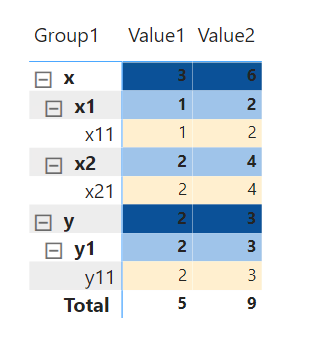
Good day all. Would like to know if there is a way to format the left side part of the matrix?
As you can see, I managed to create a formatting on the values part of the matrix using a measure (see below).

Would like to have a different color per grouping, but want to extend it to the left side of the matrix.

thescrimpton_0-1666774808489.png

thescrimpton_1-1666774958926.png


1 ACCEPTED SOLUTION
amitchandak
Super User
Super User

@thescrimpton , In the matrix you can only color Values using conditional formatting. As of now row/Column(pivot) are not supported.


You can log an idea- https://ideas.powerbi.com/ideas/

Share with Power BI Enthusiasts: Full Power BI Video (20 Hours) YouTube
Microsoft Fabric Series 60+ Videos YouTube
Microsoft Fabric Hindi End to End YouTube

View solution in original post

2 REPLIES 2
amitchandak
Super User
Super User

@thescrimpton , In the matrix you can only color Values using conditional formatting. As of now row/Column(pivot) are not supported.


You can log an idea- https://ideas.powerbi.com/ideas/

Share with Power BI Enthusiasts: Full Power BI Video (20 Hours) YouTube
Microsoft Fabric Series 60+ Videos YouTube
Microsoft Fabric Hindi End to End YouTube

That means, I can only format the things on the left side with one color for everything right?

Helpful resources

Announcements
Fabric Data Days is here Carousel

Data Days 2026

Don't miss out on Data Days, June 15 through August 7. Learn Fabric, Power BI, SQL, AI and more.

Power BI DataViz World Championships carousel

Power BI DataViz World Championships - June 2026

A new Power BI DataViz World Championship is coming this June! Don't miss out on submitting your entry.