Join us at FabCon Atlanta from March 16 - 20, 2026, for the ultimate Fabric, Power BI, AI and SQL community-led event. Save $200 with code FABCOMM.
Register now!The Power BI Data Visualization World Championships is back! Get ahead of the game and start preparing now! Learn more
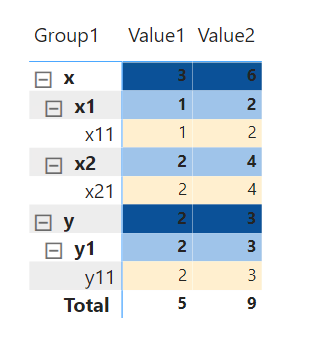
Good day all. Would like to know if there is a way to format the left side part of the matrix?
As you can see, I managed to create a formatting on the values part of the matrix using a measure (see below).
Would like to have a different color per grouping, but want to extend it to the left side of the matrix.
Solved! Go to Solution.
@thescrimpton , In the matrix you can only color Values using conditional formatting. As of now row/Column(pivot) are not supported.
You can log an idea- https://ideas.powerbi.com/ideas/
@thescrimpton , In the matrix you can only color Values using conditional formatting. As of now row/Column(pivot) are not supported.
You can log an idea- https://ideas.powerbi.com/ideas/
That means, I can only format the things on the left side with one color for everything right?
The Power BI Data Visualization World Championships is back! Get ahead of the game and start preparing now!
| User | Count |
|---|---|
| 38 | |
| 36 | |
| 33 | |
| 33 | |
| 29 |
| User | Count |
|---|---|
| 134 | |
| 96 | |
| 78 | |
| 67 | |
| 65 |