cancel
Showing results for 
Search instead for 
Did you mean: 

The Power BI Data Visualization World Championships is back! Get ahead of the game and start preparing now! Learn more

Reply
Gully3583
Frequent Visitor

Matrix Conditional Formating based on previous row

Hi everyone,


Need a little help to format a matrix I'm building.


I have two tables:

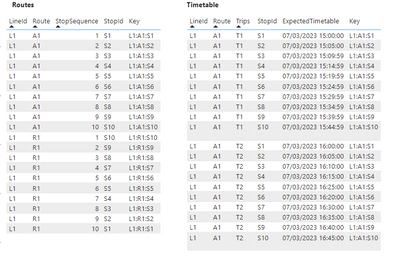
  • Routes: contains the theoretical routes of a bus line with its stops and the order of service
  • Timetable: contains the actual times of passage at each bus stop

I have created a key to link these two tables: Key = [IdLine]:[IdRoute]:[IdStop]

Gully3583_0-1678200185331.png


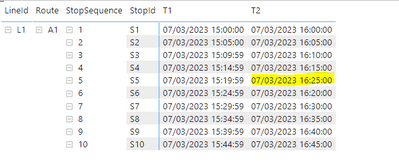
I have then created the following matrix in order to show differences between theoretical and actual stop sequence for a route. In order to do so I have displayed theoretical stop sequences on the left side and display actual passage time as value. To make it easier to read, I would like to put in red the cells for which the passage time is greater than that of the previous line (which means that there is a difference between theoretical and actual stop sequence).

Example down below :

Gully3583_1-1678199576185.png


I would really appreciate any help, thanks in advance !!

1 ACCEPTED SOLUTION
Gully3583
Frequent Visitor

Thanks for the answer,

I have found a solution thnaks to the OFFSET function. I post it here in case someone is interested 


1. Create a new table


Test = SUMMARIZE(timetable, timetable[LineId], timetable[Route], timetable[Trips], routes[StopSequence], timetable[StopId], timetable[ExpectedTimetable])


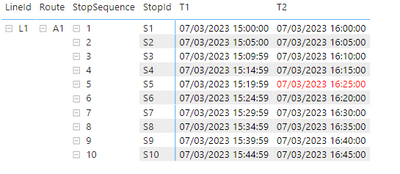
2. Create new measure and use it to apply conditional formating on timetable[ExpectedTimetable]


_offset = 
VAR nextrow = 
CALCULATE(
    MAX(Test[ExpectedTimetable]),
    OFFSET(
        1, 
        ALLSELECTED(Test), 
        ORDERBY(Test[Trips], ASC, Test[StopSequence], ASC)
        )
    )

VAR currentrow = 
CALCULATE(
    MAX(Test[ExpectedTimetable]),
    OFFSET(
        0, 
        ALLSELECTED(Test), 
        ORDERBY(Test[Trips], ASC, Test[StopSequence], ASC)
        )
    )
RETURN
    IF(nextrow <> BLANK() && nextrow < currentrow, "Red", "Black")


Gully3583_0-1678466758955.png


View solution in original post

2 REPLIES 2
Gully3583
Frequent Visitor

Thanks for the answer,

I have found a solution thnaks to the OFFSET function. I post it here in case someone is interested 


1. Create a new table


Test = SUMMARIZE(timetable, timetable[LineId], timetable[Route], timetable[Trips], routes[StopSequence], timetable[StopId], timetable[ExpectedTimetable])


2. Create new measure and use it to apply conditional formating on timetable[ExpectedTimetable]


_offset = 
VAR nextrow = 
CALCULATE(
    MAX(Test[ExpectedTimetable]),
    OFFSET(
        1, 
        ALLSELECTED(Test), 
        ORDERBY(Test[Trips], ASC, Test[StopSequence], ASC)
        )
    )

VAR currentrow = 
CALCULATE(
    MAX(Test[ExpectedTimetable]),
    OFFSET(
        0, 
        ALLSELECTED(Test), 
        ORDERBY(Test[Trips], ASC, Test[StopSequence], ASC)
        )
    )
RETURN
    IF(nextrow <> BLANK() && nextrow < currentrow, "Red", "Black")


Gully3583_0-1678466758955.png


Anonymous
Not applicable

Hi @Gully3583,

Did you mean to find the records which bigger than new one? If that is the case, you can use current ‘stop Sequence’ and category group values to find out current next records and return color code to use as the condition formatting expressions.

formula =
VAR currSequence =
    CALCULATE (
        MAX ( Table[StopSequence] ),
        ALLSELECTED ( Table ),
        VALUES ( Table[LineID] ),
        VALUES ( Table[Route] ),
        VALUES ( Table[Trips] )
    )
VAR currDate =
    MAX ( Table[ExceptedTime] )
VAR nextDate =
    CALCULATE (
        MAX ( Table[ExceptedTime] ),
        FILTER ( ALLSELECTED ( Table ), Table[StopSequence] = currSequence + 1 ),
        VALUES ( Table[LineID] ),
        VALUES ( Table[Route] ),
        VALUES ( Table[Trips] )
    )
RETURN
    IF ( nextDate <> BLANK () && currDate > nextDate, "Red", "Black" )

Regards,

Xiaoxin Sheng

Helpful resources

Announcements
Power BI DataViz World Championships

Power BI Dataviz World Championships

The Power BI Data Visualization World Championships is back! Get ahead of the game and start preparing now!

December 2025 Power BI Update Carousel

Power BI Monthly Update - December 2025

Check out the December 2025 Power BI Holiday Recap!

FabCon Atlanta 2026 carousel

FabCon Atlanta 2026

Join us at FabCon Atlanta, March 16-20, for the ultimate Fabric, Power BI, AI and SQL community-led event. Save $200 with code FABCOMM.

Top Solution Authors