Don't miss your chance to take the Fabric Data Engineer (DP-600) exam for FREE! Find out how by watching the DP-600 session on-demand now through April 28th.
Learn moreJoin the FabCon + SQLCon recap series. Up next: Power BI, Real-Time Intelligence, IQ and AI, and Data Factory take center stage. All sessions are available on-demand after the live show. Register now
Hello,
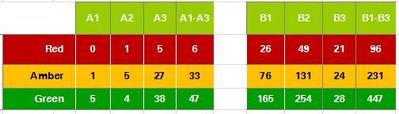
Can anyone please suggest how I can get the attached format report. I have RAG, Grade and count of employees columns. The Grades are A1, A2, A3, B1, B2 and B3 etc but they need to be split into two tables (A1 to A3 in first table and B1 to B3 in second table) and I need to do display sum of A1 to A3 in first table at the end and sum of B1 to B3 in second table. The only thing I am trying to find is how I can sum A1 to A3 and display in the table and also do the colouring for red,amber and green in the table. I am trying in matrix table but please suggest if there is better/easy way to acheive this.
Solved! Go to Solution.
Hi @Anonymous
Create a calculated column
category_grade = LEFT([grade],1)
Create a measure to use for coloring
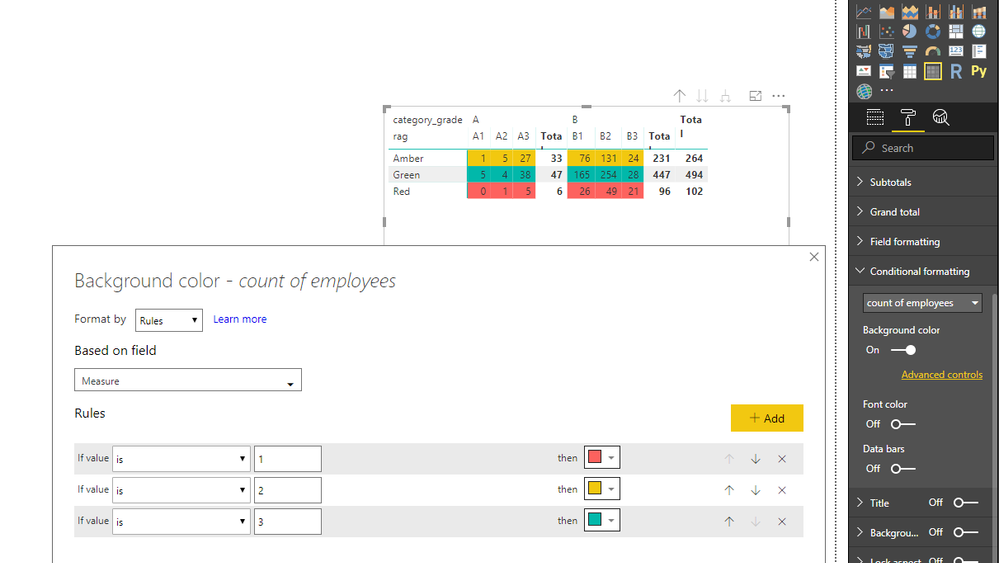
Measure = SWITCH(MAX([rag]),"Red",1,"Amber",2,"Green",3)
Best Regards
Maggie
Hi @Anonymous
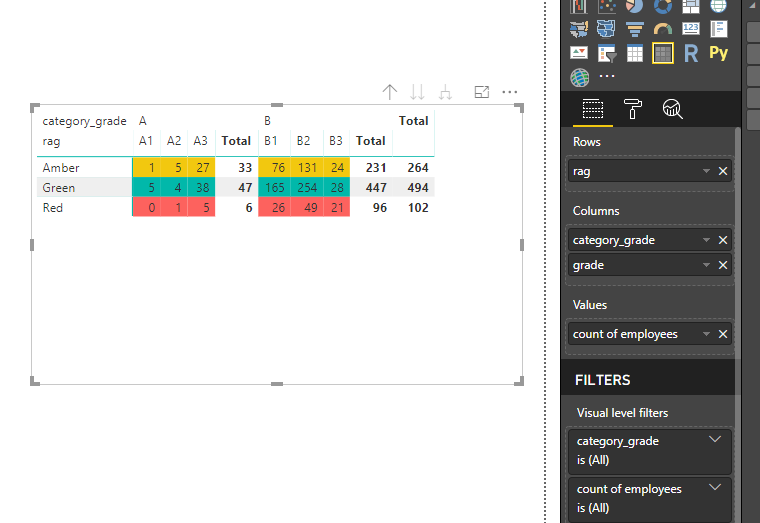
Create a calculated column to show "A" for A1, A2, A3 or "B" B1,B2,B3, then add [category_grade] in the "Columns" field.
category_grade = LEFT([grade],1)
Best Regards
Maggie
Hi Maggie (@v-juanli-msft ),
Thanks for your reply. You mentioned that I have to create calculated column, so can you please tell the logic for that column.
Kind Regards,
Nivas
Hi @v-juanli-msft ,
Also I am not sure how you have given the colouring as I can only see colouring for summarization values in Power BI, cant see option based on text fields (in this case its Rag column).
Hi @Anonymous
Create a calculated column
category_grade = LEFT([grade],1)
Create a measure to use for coloring
Measure = SWITCH(MAX([rag]),"Red",1,"Amber",2,"Green",3)
Best Regards
Maggie
Check out the April 2026 Power BI update to learn about new features.
If you have recently started exploring Fabric, we'd love to hear how it's going. Your feedback can help with product improvements.
A new Power BI DataViz World Championship is coming this June! Don't miss out on submitting your entry.
| User | Count |
|---|---|
| 41 | |
| 37 | |
| 34 | |
| 21 | |
| 16 |
| User | Count |
|---|---|
| 65 | |
| 62 | |
| 31 | |
| 26 | |
| 25 |