cancel
Showing results for 
Search instead for 
Did you mean: 

July 7 - July 17 | Round 2 of the Power BI Dataviz World Championships. Don't miss your chance! Learn more

Reply
windoz
Frequent Visitor

Matrix - Background Color Coding

Hi,


Is there a way where the following can be achieved: (I have looked and tried other methods but cannot specifially get this to work)


For example: 

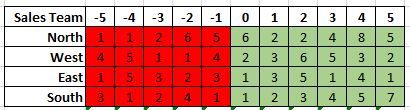
How can I colour code the background so that for -3 (column), it will always be red as shown below or for anything above 0 to go green? (as below)


Sales Team DataSales Team Data


Many Thanks.

1 ACCEPTED SOLUTION
v-lionel-msft
Community Support
Community Support

Hi @windoz ,

Here's my original data table:

hh11.PNG

Then, create a measure like this:


Background_color = 
IF(
    MAX(Sheet4[Column]) < 0,
    "red",
    "green"
)


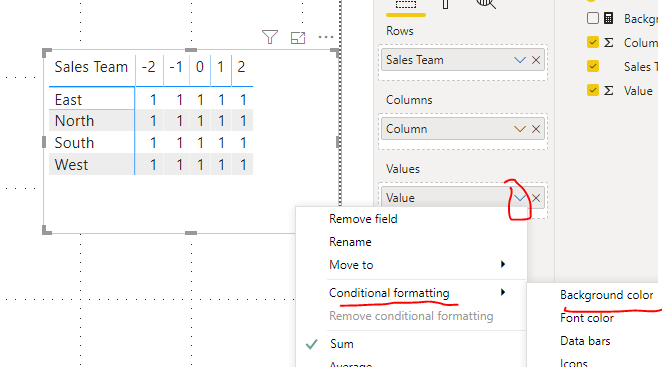
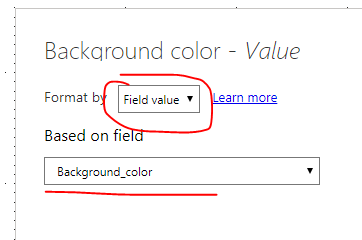
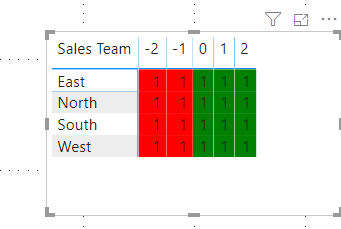
Then, do like this:

hh14.PNG

hh13.PNG

hh15.PNG


Best regards,
Lionel Chen

If this post helps, then please consider Accept it as the solution to help the other members find it more quickly.

View solution in original post

3 REPLIES 3
v-lionel-msft
Community Support
Community Support

Hi @windoz ,

Here's my original data table:

hh11.PNG

Then, create a measure like this:


Background_color = 
IF(
    MAX(Sheet4[Column]) < 0,
    "red",
    "green"
)


Then, do like this:

hh14.PNG

hh13.PNG

hh15.PNG


Best regards,
Lionel Chen

If this post helps, then please consider Accept it as the solution to help the other members find it more quickly.

Thank you for making time to look at my issue and respond.


Your solution works, much apprecited!

az38
Community Champion
Community Champion

Hi @windoz 

There is a lot of functionality to set background by rule. See here https://docs.microsoft.com/en-us/power-bi/desktop-conditional-table-formatting Color by rules section and if you will have problem let us know.

You can choose Based on field: Sales team and Summarization: Sum parameters


do not hesitate to give a kudo to useful posts and mark solutions as solution

LinkedIn


do not hesitate to give a kudo to useful posts and mark solutions as solution
LinkedIn

Helpful resources

Announcements
FabCon and SQLCon Barcelona 2026

FabCon & SQLCon – Barcelona 2026

Join us in Barcelona for FabCon and SQLCon, the Fabric, Power BI, SQL, and AI community event. Save €200 with code FABCMTY200.

60 days of Data Days Carousel

Data Days 2026

Join Data Days 2026: 60 days of free live/on-demand sessions, challenges, study groups, and certification opportunities.

Power BI DataViz World Championships carousel

Power BI DataViz World Championships - June 2026

A new Power BI DataViz World Championship is coming this June! Don't miss out on submitting your entry.

Top Solution Authors