Don't miss your chance to take the Fabric Data Engineer (DP-600) exam for FREE! Find out how by attending the DP-600 session on April 23rd (pacific time), live or on-demand.
Learn moreNext up in the FabCon + SQLCon recap series: The roadmap for Microsoft SQL and Maximizing Developer experiences in Fabric. All sessions are available on-demand after the live show. Register now
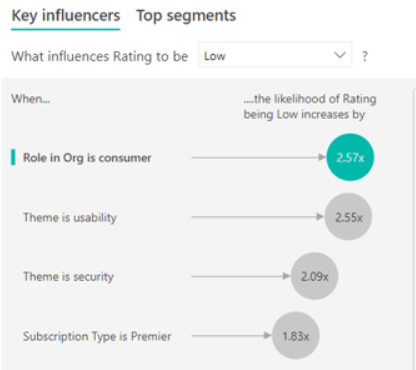
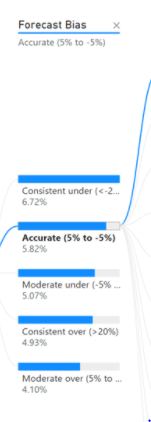
I have searched the math beneath the function, AI , in Power BI. But I only know the model used in Key Influencers visualization is regression, and the model used in Decomposition Tree Visual is decision tree. There is no article showing how these models work. Can anyone tell me how the models work. There are many setup when running these models. So, I wonder how to calculate the input values to get the output values. To have the best interpretation of a dashboard, I must know the theory. Thanks for a million.
These are templates about decomposition tree visuals and key influencers visualizations. I wonder how to calculate these values below. What formulas are used?
https://docs.microsoft.com/en-us/power-bi/visuals/power-bi-visualization-decomposition-tree
https://docs.microsoft.com/en-us/power-bi/visuals/power-bi-visualization-influencers
Hi @Karen1015 ,
Not clear about your question.
If you want to know about data modeling, please kindly take a look at :
Or do you want to know how to use the most appropriate graph in Power BI based on your data? If so, hope these blogs help:
Choosing charts for data visualization
Best ways to visualise your data in Power BI - PragmatiQ Solutions
Best Regards,
Eyelyn Qin
If this post helps, then please consider Accept it as the solution to help the other members find it more quickly.
If you have recently started exploring Fabric, we'd love to hear how it's going. Your feedback can help with product improvements.
A new Power BI DataViz World Championship is coming this June! Don't miss out on submitting your entry.
Share feedback directly with Fabric product managers, participate in targeted research studies and influence the Fabric roadmap.
| User | Count |
|---|---|
| 48 | |
| 43 | |
| 39 | |
| 19 | |
| 17 |
| User | Count |
|---|---|
| 68 | |
| 63 | |
| 31 | |
| 30 | |
| 23 |