cancel
Showing results for 
Search instead for 
Did you mean: 

The Power BI Data Visualization World Championships is back! Get ahead of the game and start preparing now! Learn more

Reply
Anonymous
Not applicable

Matching dates to a holiday table

I have a column that contains dates that cases were opened - 'Cases'[CreatedDate] with a date/time format of 12/26/2016 5:56:17 PM


In a second table I have all corporate holidays listed - 'Holidays'[Holiday Date] with a date format of 12/16/2016


I want to build a calculated column that identifies matching dates and produces a result of "True" in the column if the CreatedDate matches a Holiday Date. 


I built a relationship between the values and was able to get a column to show the date, but can't figure out how to build the matching output I'm trying to get.


1 ACCEPTED SOLUTION
v-juanli-msft
Community Support
Community Support

Hi @Anonymous

“I built a relationship between the values and was able to get a column to show the date”

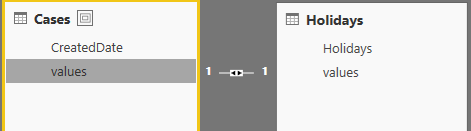
Do you mean “built a relationship between the values” instead of building a relationship on the date column?

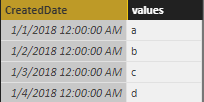
Does the following example do as you said?

1.png2.png

3.png

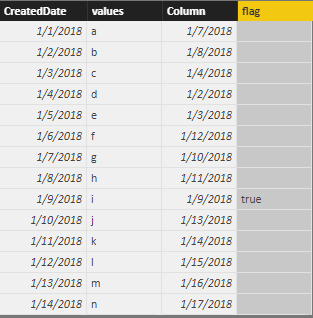
Then with a DAX, I can lookup “Holiday” based on “value” as follows.

Next, identify matching dates and produce a result of "True"

4.png

Column = LOOKUPVALUE(Holidays[Holidays],'Cases'[CreatedDate],[CreatedDate])
flag = IF([Column]=[CreatedDate],"true",BLANK())

Best Regards

Maggie

View solution in original post

2 REPLIES 2
v-juanli-msft
Community Support
Community Support

Hi @Anonymous

“I built a relationship between the values and was able to get a column to show the date”

Do you mean “built a relationship between the values” instead of building a relationship on the date column?

Does the following example do as you said?

1.png2.png

3.png

Then with a DAX, I can lookup “Holiday” based on “value” as follows.

Next, identify matching dates and produce a result of "True"

4.png

Column = LOOKUPVALUE(Holidays[Holidays],'Cases'[CreatedDate],[CreatedDate])
flag = IF([Column]=[CreatedDate],"true",BLANK())

Best Regards

Maggie

MattAllington
Community Champion
Community Champion

There is a lot to learn and do. 


Remove the time portion from your column

create a calendar table. https://exceleratorbi.com.au/power-pivot-calendar-tables/

Join both current tables to be calendar table, then use the calendar table date column and not the other date columns https://exceleratorbi.com.au/relationships-power-bi-power-pivot/

dont Write a calculate column https://exceleratorbi.com.au/calculated-columns-vs-measures-dax/


depending on what you are trying to do, you could then creat a matrix using calendar date on rows, then pull in the count of cases and the holiday flag. 


* Matt is an 8 times Microsoft MVP (Power BI) and author of the Power BI Book Supercharge Power BI.
I will not give you bad advice, even if you unknowingly ask for it.

Helpful resources

Announcements
Power BI DataViz World Championships

Power BI Dataviz World Championships

The Power BI Data Visualization World Championships is back! Get ahead of the game and start preparing now!

December 2025 Power BI Update Carousel

Power BI Monthly Update - December 2025

Check out the December 2025 Power BI Holiday Recap!

FabCon Atlanta 2026 carousel

FabCon Atlanta 2026

Join us at FabCon Atlanta, March 16-20, for the ultimate Fabric, Power BI, AI and SQL community-led event. Save $200 with code FABCOMM.