Join us at FabCon Atlanta from March 16 - 20, 2026, for the ultimate Fabric, Power BI, AI and SQL community-led event. Save $200 with code FABCOMM.
Register now!The Power BI Data Visualization World Championships is back! Get ahead of the game and start preparing now! Learn more
Im new here so first I would like to say Hi 🙂
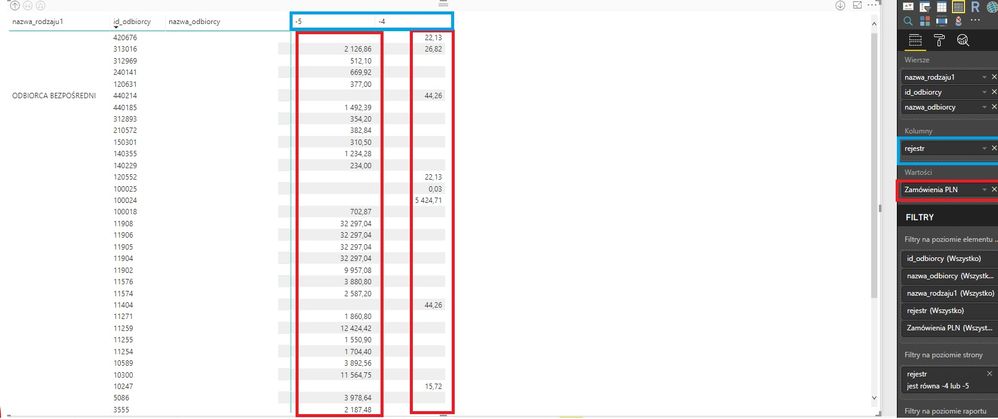
I stuck with a "pivottable". I need to match: if "Zamowienia PLN">0 and appear in both columns: -4 and -5 then 1, if not match 0.
Can someone help how to deal with it?
Solved! Go to Solution.
Drag measure below to visual level filter and set Show items when the value is 1.
Measure =
IF (
CALCULATE ( SUM ( Table1[Zamowienia PLN] ), Table1[rejestr] = -5 )
> 0
&& CALCULATE ( SUM ( Table1[Zamowienia PLN] ), Table1[rejestr] = -4 )
> 0,
1
)
Drag measure below to visual level filter and set Show items when the value is 1.
Measure =
IF (
CALCULATE ( SUM ( Table1[Zamowienia PLN] ), Table1[rejestr] = -5 )
> 0
&& CALCULATE ( SUM ( Table1[Zamowienia PLN] ), Table1[rejestr] = -4 )
> 0,
1
)
Thank You for answer.
I appreciate the help, it works perfectly 🙂
In Polish version of PBI I had to use ";" instead of "," in the IF formula and of course changed Table1 with the real name of the table.
Measure =
IF (
CALCULATE ( SUM ( Table1[Zamowienia PLN] ), Table1[rejestr] = -5 )
> 0
&& CALCULATE ( SUM ( Table1[Zamowienia PLN] ), Table1[rejestr] = -4 )
> 0;
1
)
The Power BI Data Visualization World Championships is back! Get ahead of the game and start preparing now!
| User | Count |
|---|---|
| 41 | |
| 37 | |
| 35 | |
| 35 | |
| 28 |
| User | Count |
|---|---|
| 134 | |
| 101 | |
| 71 | |
| 67 | |
| 65 |