Join us in Barcelona for FabCon and SQLCon, September 28 - October 1, 2026.
This is best Fabric, Power BI, SQL and AI community event. How do we know? The last event sold out! Save €200 with code FABCMTY200.
Register now- Power BI forums
- Get Help with Power BI
- Desktop
- Service
- Report Server
- Power Query
- Mobile Apps
- Developer
- DAX Commands and Tips
- Custom Visuals Development Discussion
- Health and Life Sciences
- Power BI Spanish forums
- Translated Spanish Desktop
- Training and Consulting
- Instructor Led Training
- Dashboard in a Day for Women, by Women
- Galleries
- Data Stories Gallery
- Themes Gallery
- Contests Gallery
- QuickViz Gallery
- Quick Measures Gallery
- Visual Calculations Gallery
- Fabric Apps Gallery
- Notebook Gallery
- Translytical Task Flow Gallery
- TMDL Gallery
- R Script Showcase
- Webinars and Video Gallery
- Ideas
- Custom Visuals Ideas (read-only)
- Issues
- Issues
- Events
- Upcoming Events
The Fabric community is upgrading! Read all of the details including the timeline and what you can expect. Learn more
- Power BI forums
- Forums
- Get Help with Power BI
- Desktop
- Re: Matching Values
- Subscribe to RSS Feed
- Mark Topic as New
- Mark Topic as Read
- Float this Topic for Current User
- Bookmark
- Subscribe
- Printer Friendly Page

- Mark as New
- Bookmark
- Subscribe
- Mute
- Subscribe to RSS Feed
- Permalink
- Report Inappropriate Content
Matching Values
I am new to Power BI and this should be a simple task but I can't get it to work
Table 1 contains a column "Location ID" (an 8 digit number)
Table 2 contains a column "Site" (an 8 digit number)
I need a calculation that shows if "Location ID" = "Site" return "True"
Solved! Go to Solution.


- Mark as New
- Bookmark
- Subscribe
- Mute
- Subscribe to RSS Feed
- Permalink
- Report Inappropriate Content
@Anonymous Well, add a column to Table 1 or Table 2 like below.
Flag = IF(Table1[Location ID] IN VALUES(Table2[Site]),"True","False")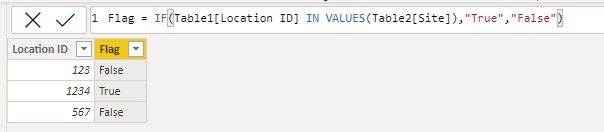


- Mark as New
- Bookmark
- Subscribe
- Mute
- Subscribe to RSS Feed
- Permalink
- Report Inappropriate Content
@Anonymous ,
New column in table 1
if(isblank(countx(filter(Table2,table1[Location ID] = table2[Site]),table2[Site])), false(), true())
new column in table 2
if(isblank(countx(filter(Table1,table1[Location ID] = table2[Site]),table1[Location ID] )), false(), true())
- Mark as New
- Bookmark
- Subscribe
- Mute
- Subscribe to RSS Feed
- Permalink
- Report Inappropriate Content
Thank you for a quick answer
Unfortunately, I am not sure how this helps
Let me explain further,
The company has two databases
One is from SAP and is thought of as the "Source of Truth" and the other is a Support DataBase where the updates have been put in manually (many mistakes:()
In the SAP Db, the column is called "Site" and in the support Db, the column is called "Location ID" both should match for a given location BUT they don't, see below. Only one record matches the ID number but the address is wrong
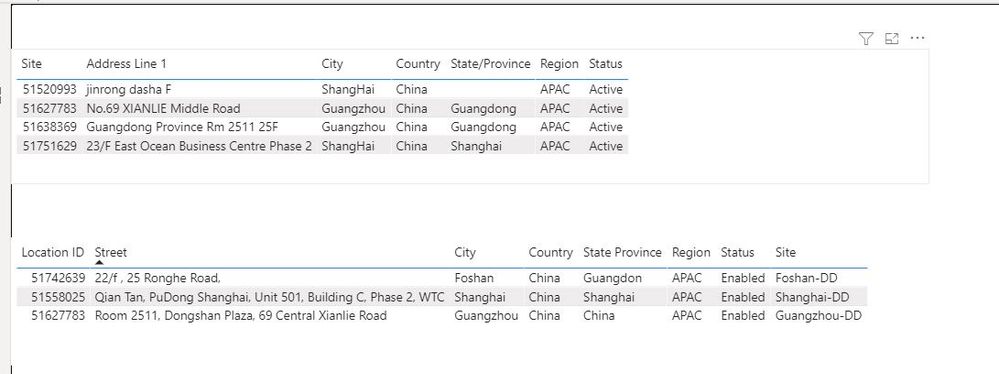
Maybe i am going about this the wrong way 😞
- Mark as New
- Bookmark
- Subscribe
- Mute
- Subscribe to RSS Feed
- Permalink
- Report Inappropriate Content
@Anonymous
Sorry I don't quite understand your expected result. Can you expain it with some sample data? For example, in your screenshot, only 51627783 appears in both tables, should it be "True"? And for other IDs, should they all be "False"? Does an ID number appear in a table only once (not duplicate)? In which table do you hope to add a new column to show the result or you want a measure to calculate the result?
Regards,
Jing
- Mark as New
- Bookmark
- Subscribe
- Mute
- Subscribe to RSS Feed
- Permalink
- Report Inappropriate Content
Hi Jing
Thank you for your reply
The result should not be duplicated in the table and I just want a calculation IF xxx is in Both tables "True" if Unique to a table "False"
- Mark as New
- Bookmark
- Subscribe
- Mute
- Subscribe to RSS Feed
- Permalink
- Report Inappropriate Content
@Anonymous Well, add a column to Table 1 or Table 2 like below.
Flag = IF(Table1[Location ID] IN VALUES(Table2[Site]),"True","False")- Mark as New
- Bookmark
- Subscribe
- Mute
- Subscribe to RSS Feed
- Permalink
- Report Inappropriate Content
Thank you 🙂
I can know complete analysis
Helpful resources

FabCon & SQLCon – Barcelona 2026
Join us in Barcelona for FabCon and SQLCon, the Fabric, Power BI, SQL, and AI community event. Save €200 with code FABCMTY200.

Power BI DataViz World Championships - June 2026
A new Power BI DataViz World Championship is coming this June! Don't miss out on submitting your entry.

| User | Count |
|---|---|
| 23 | |
| 22 | |
| 14 | |
| 14 | |
| 13 |


| User | Count |
|---|---|
| 47 | |
| 39 | |
| 24 | |
| 22 | |
| 20 |


