FabCon is coming to Atlanta
Join us at FabCon Atlanta from March 16 - 20, 2026, for the ultimate Fabric, Power BI, AI and SQL community-led event. Save $200 with code FABCOMM.
Register now!- Power BI forums
- Get Help with Power BI
- Desktop
- Service
- Report Server
- Power Query
- Mobile Apps
- Developer
- DAX Commands and Tips
- Custom Visuals Development Discussion
- Health and Life Sciences
- Power BI Spanish forums
- Translated Spanish Desktop
- Training and Consulting
- Instructor Led Training
- Dashboard in a Day for Women, by Women
- Galleries
- Data Stories Gallery
- Themes Gallery
- Contests Gallery
- QuickViz Gallery
- Quick Measures Gallery
- Visual Calculations Gallery
- Notebook Gallery
- Translytical Task Flow Gallery
- TMDL Gallery
- R Script Showcase
- Webinars and Video Gallery
- Ideas
- Custom Visuals Ideas (read-only)
- Issues
- Issues
- Events
- Upcoming Events
Get Fabric Certified for FREE during Fabric Data Days. Don't miss your chance! Request now
- Power BI forums
- Forums
- Get Help with Power BI
- Desktop
- Re: Match Data in Power BI Desktop
- Subscribe to RSS Feed
- Mark Topic as New
- Mark Topic as Read
- Float this Topic for Current User
- Bookmark
- Subscribe
- Printer Friendly Page

- Mark as New
- Bookmark
- Subscribe
- Mute
- Subscribe to RSS Feed
- Permalink
- Report Inappropriate Content
Match Data in Power BI Desktop
Hello Guys,
I am new using power bi, and need to relate two tables that share a common column ("Clients"), it means, data with the same information
My problem is that in one column I have 10 different clients and in the other I have only 6 that coincide, and 2 that do not
For this reason,PBI does not allow me relate the two tables.
Some idea of how to relate the two columns, since later its gona be imposible do it manually
Please I need some help


- Mark as New
- Bookmark
- Subscribe
- Mute
- Subscribe to RSS Feed
- Permalink
- Report Inappropriate Content
Hi,
Using the query editor, append the Clients column from both tables and remove duplicates. Now create a realtionship from the Clients from of both tables to this third table. In any visual, drag the clients column from the third table.
Hope this helps.
Regards,
Ashish Mathur
http://www.ashishmathur.com
https://www.linkedin.com/in/excelenthusiasts/
- Mark as New
- Bookmark
- Subscribe
- Mute
- Subscribe to RSS Feed
- Permalink
- Report Inappropriate Content
Hello Ashish_Mathur
What do you mean with append both colums... create a thrid appended table with all the clients?
So, then what is the way to combine the values of the each same Client with the columns of the two different tables
For example:
I want to have the line like these
10002 10:00 14:00 11:00 1
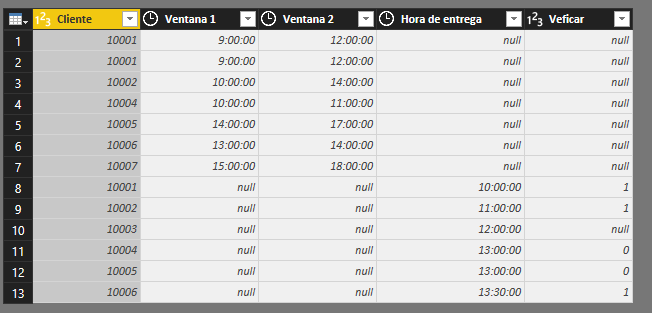
Please Help me
- Mark as New
- Bookmark
- Subscribe
- Mute
- Subscribe to RSS Feed
- Permalink
- Report Inappropriate Content
Hi,
Please show your datasets and your expected result.
Regards,
Ashish Mathur
http://www.ashishmathur.com
https://www.linkedin.com/in/excelenthusiasts/
- Mark as New
- Bookmark
- Subscribe
- Mute
- Subscribe to RSS Feed
- Permalink
- Report Inappropriate Content
HIi,
Dataset 1
| Client | IVR_1 | FVR_1 |
| 100001 | 8:30:00 | 11:00:00 |
| 100003 | 8:00:00 | 17:00:00 |
| 100005 | 7:00:00 | 12:00:00 |
| 100006 | 6:00:00 | 17:00:00 |
| 100008 | 8:00:00 | 17:00:00 |
| 100009 | 8:30:00 | 17:00:00 |
| 100012 | 8:00:00 | 16:00:00 |
| 100012 | 8:00:00 | 12:00:00 |
| 100013 | 7:00:00 | 13:00:00 |
| 100014 | 8:00:00 | 16:00:00 |
| 100015 | 8:00:00 | 12:00:00 |
| 100016 | 7:00:00 | 12:00:00 |
| 100018 | 7:00:00 | 12:00:00 |
| 100019 | 7:00:00 | 17:00:00 |
| 100023 | 7:00:00 | 13:00:00 |
| 100025 | 7:00:00 | 13:00:00 |
| 100027 | 8:00:00 | 17:00:00 |
| 100029 | 7:00:00 | 12:00:00 |
| 100031 | 8:00:00 | 12:00:00 |
Dataset 2
| Client | Delivery hour |
| 117612 | 16:51:29 |
| 117612 | 17:51:29 |
| 117612 | 18:51:29 |
| 116403 | 19:51:29 |
| 116403 | 20:51:29 |
| 116403 | 21:51:29 |
| 116403 | 22:51:29 |
| 116403 | 23:51:29 |
| 116403 | 0:51:29 |
| 116403 | 1:51:29 |
| 116403 | 2:51:29 |
Expeceted Result
| Client | Delivery hour | IVR_1 | FVR_1 |
| 117612 | 16:51:29 | 8:30:00 | 11:00:00 |
I want to join both tables with all the clients, to se if the delivery time its between IV_R1 and IV_R2, the problems is that I dont have the same client information, it does not allowme to relate.
Thanks so much
- Mark as New
- Bookmark
- Subscribe
- Mute
- Subscribe to RSS Feed
- Permalink
- Report Inappropriate Content
Hi,
I am sorry but i cannot understand why the answer should be 8:30 and 11:00. Please explain.
Regards,
Ashish Mathur
http://www.ashishmathur.com
https://www.linkedin.com/in/excelenthusiasts/
- Mark as New
- Bookmark
- Subscribe
- Mute
- Subscribe to RSS Feed
- Permalink
- Report Inappropriate Content
Hi,
Sorry, the 2 datasets looks like these:
Dataset 1:
| Client | IVR_1 | FVR_1 |
| 100012 | 8:30:00 | 11:00:00 |
| ... | ... | ... |
Dataset 2:
| Client | Delivery hour |
| 100012 | 16:51:29 |
| .. | ... |
And the result would look like this:
| Client | Delivery hour | IVR_1 | FVR_1 |
| 100012 | 16:51:29 | 8:00:00 | 16:00:00 |
| ... | .. | ... | ... |
- Mark as New
- Bookmark
- Subscribe
- Mute
- Subscribe to RSS Feed
- Permalink
- Report Inappropriate Content
Hi,
So when the client ID in Table 2 matches the client ID in Table 1, you want to extract the IVR_1 and FVR_1 from Table 1. Am i correct? If yes, then share a dataset (which i can paste into MS Excel) with matching clinet ID's in both tables.
Regards,
Ashish Mathur
http://www.ashishmathur.com
https://www.linkedin.com/in/excelenthusiasts/
- Mark as New
- Bookmark
- Subscribe
- Mute
- Subscribe to RSS Feed
- Permalink
- Report Inappropriate Content
Hi,
Yes, you are correct, i need the exact thing
Can you give some mail address, cause the data is too big it does not allow me to paste
Or how can I share the datasets with you?
- Mark as New
- Bookmark
- Subscribe
- Mute
- Subscribe to RSS Feed
- Permalink
- Report Inappropriate Content
Hi,
Upload the file to Google Drive/One Drive and share the download link here.
Regards,
Ashish Mathur
http://www.ashishmathur.com
https://www.linkedin.com/in/excelenthusiasts/
- Mark as New
- Bookmark
- Subscribe
- Mute
- Subscribe to RSS Feed
- Permalink
- Report Inappropriate Content
- Mark as New
- Bookmark
- Subscribe
- Mute
- Subscribe to RSS Feed
- Permalink
- Report Inappropriate Content
Hi,
You may download my solution file from here. Hope this helps.
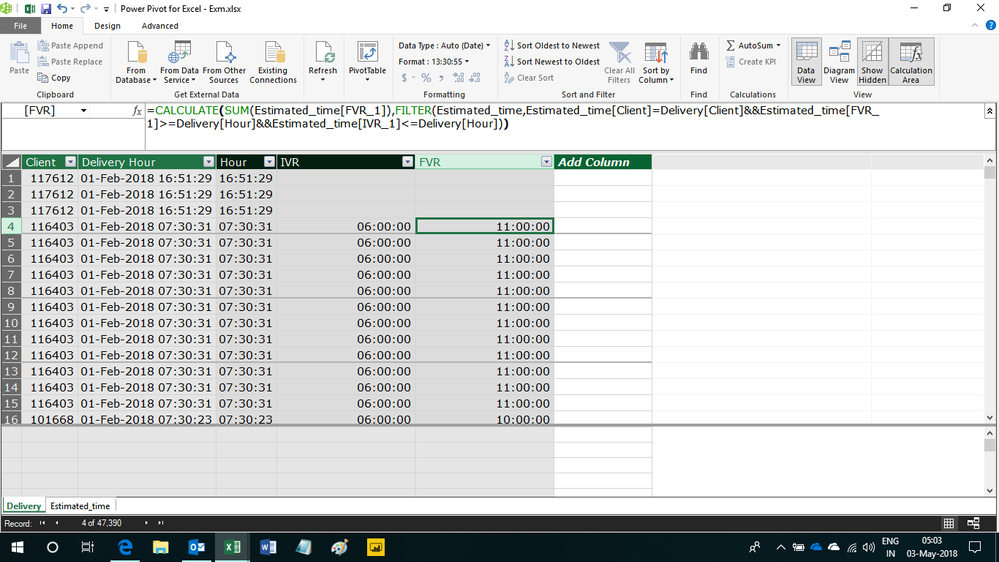
Regards,
Ashish Mathur
http://www.ashishmathur.com
https://www.linkedin.com/in/excelenthusiasts/
- Mark as New
- Bookmark
- Subscribe
- Mute
- Subscribe to RSS Feed
- Permalink
- Report Inappropriate Content
Hi,
Thanks Ashish_Mathur, the link you sent is the same file's direcction i sent
- Mark as New
- Bookmark
- Subscribe
- Mute
- Subscribe to RSS Feed
- Permalink
- Report Inappropriate Content
Hi,
The link i sent you contains the solution. Click on PowerPivot > Manage and you will see the solutio in the columns IVR and FVR in the Delivery tab.
Hope this helps.
Regards,
Ashish Mathur
http://www.ashishmathur.com
https://www.linkedin.com/in/excelenthusiasts/
Helpful resources

Power BI Monthly Update - November 2025
Check out the November 2025 Power BI update to learn about new features.

Fabric Data Days
Advance your Data & AI career with 50 days of live learning, contests, hands-on challenges, study groups & certifications and more!

FabCon Atlanta 2026
Join us at FabCon Atlanta, March 16-20, for the ultimate Fabric, Power BI, AI and SQL community-led event. Save $200 with code FABCOMM.


