cancel
Showing results for 
Search instead for 
Did you mean: 

The Power BI Data Visualization World Championships is back! Get ahead of the game and start preparing now! Learn more

Reply
tango1201
Frequent Visitor

Master Table for Cross Referencing

I have three data tables from three separate sources that should reconcile to each other, in theory, but do not.  I would like to create a "Master" table from the three in order to build an exception list and identify the non-reconclied items.  The unique identifier is the same across all three tables and duplicate unique IDs within any table can exist.


Something like combine Table1[UniqueID], Table2[UniqueID] & Table3[UniqueID] into MasterTable[UniqueID] so that I have a single column table of all unique IDs with all duplicates removed.  From there, I can build my cross references and exception report.


Any help is greatly appreciated.

1 ACCEPTED SOLUTION
v-huizhn-msft
Microsoft Employee
Microsoft Employee

Hi @tango1201,

I try to reproduce your scenario, I create the following sample tables.
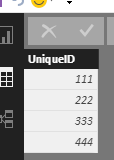
1.PNG2.PNG

Append the two tables together by clicking Test1->Append Query->Append Test2 table.

3.png

Remove other columns, only leave UniqueID column, them remove the duplicates. You will get the following result table.

6.PNG

Here is my Query statement.

let
    Source = Table.FromRows(Json.Document(Binary.Decompress(Binary.FromText("i45WMjQ0VIrViVYyMjIC08bGxmDaxMREKTYWAA==", BinaryEncoding.Base64), Compression.Deflate)), let _t = ((type text) meta [Serialized.Text = true]) in type table [UniqueID = _t]),
    #"Changed Type" = Table.TransformColumnTypes(Source,{{"UniqueID", Int64.Type}}),
    #"Appended Query" = Table.Combine({#"Changed Type", Test2}),
    #"Removed Columns" = Table.RemoveColumns(#"Appended Query",{"name"}),
    #"Removed Duplicates" = Table.Distinct(#"Removed Columns")
in
    #"Removed Duplicates"

Best Regards,
Angelia

View solution in original post

1 REPLY 1
v-huizhn-msft
Microsoft Employee
Microsoft Employee

Hi @tango1201,

I try to reproduce your scenario, I create the following sample tables.

1.PNG2.PNG

Append the two tables together by clicking Test1->Append Query->Append Test2 table.
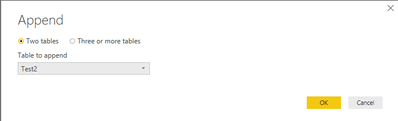
3.png

Remove other columns, only leave UniqueID column, them remove the duplicates. You will get the following result table.
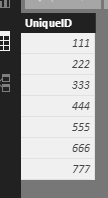
6.PNG

Here is my Query statement.

let
    Source = Table.FromRows(Json.Document(Binary.Decompress(Binary.FromText("i45WMjQ0VIrViVYyMjIC08bGxmDaxMREKTYWAA==", BinaryEncoding.Base64), Compression.Deflate)), let _t = ((type text) meta [Serialized.Text = true]) in type table [UniqueID = _t]),
    #"Changed Type" = Table.TransformColumnTypes(Source,{{"UniqueID", Int64.Type}}),
    #"Appended Query" = Table.Combine({#"Changed Type", Test2}),
    #"Removed Columns" = Table.RemoveColumns(#"Appended Query",{"name"}),
    #"Removed Duplicates" = Table.Distinct(#"Removed Columns")
in
    #"Removed Duplicates"

Best Regards,
Angelia

Helpful resources

Announcements
Power BI DataViz World Championships

Power BI Dataviz World Championships

The Power BI Data Visualization World Championships is back! Get ahead of the game and start preparing now!

December 2025 Power BI Update Carousel

Power BI Monthly Update - December 2025

Check out the December 2025 Power BI Holiday Recap!

FabCon Atlanta 2026 carousel

FabCon Atlanta 2026

Join us at FabCon Atlanta, March 16-20, for the ultimate Fabric, Power BI, AI and SQL community-led event. Save $200 with code FABCOMM.