FabCon is coming to Atlanta
Join us at FabCon Atlanta from March 16 - 20, 2026, for the ultimate Fabric, Power BI, AI and SQL community-led event. Save $200 with code FABCOMM.
Register now!- Power BI forums
- Get Help with Power BI
- Desktop
- Service
- Report Server
- Power Query
- Mobile Apps
- Developer
- DAX Commands and Tips
- Custom Visuals Development Discussion
- Health and Life Sciences
- Power BI Spanish forums
- Translated Spanish Desktop
- Training and Consulting
- Instructor Led Training
- Dashboard in a Day for Women, by Women
- Galleries
- Data Stories Gallery
- Themes Gallery
- Contests Gallery
- QuickViz Gallery
- Quick Measures Gallery
- Visual Calculations Gallery
- Notebook Gallery
- Translytical Task Flow Gallery
- TMDL Gallery
- R Script Showcase
- Webinars and Video Gallery
- Ideas
- Custom Visuals Ideas (read-only)
- Issues
- Issues
- Events
- Upcoming Events
The Power BI Data Visualization World Championships is back! Get ahead of the game and start preparing now! Learn more
- Power BI forums
- Forums
- Get Help with Power BI
- Desktop
- Re: Margin Divisible by 5?
- Subscribe to RSS Feed
- Mark Topic as New
- Mark Topic as Read
- Float this Topic for Current User
- Bookmark
- Subscribe
- Printer Friendly Page

- Mark as New
- Bookmark
- Subscribe
- Mute
- Subscribe to RSS Feed
- Permalink
- Report Inappropriate Content
Margin Divisible by 5?
Hi,
I am looking to find a calculation that will tell me whether an item was sold at a margin divisible by five or not. i.e. ..., 35%, 40%, 45%, 50%, ... etc. I figured it would be simple using the MOD function. I tried each of the following
DivisibleBy5 = IF(MOD([Margin], 0.05) = 0, "Yes", "No")
DivisibleBy5 = IF(MOD([Margin] * 100, 5) = 0, "Yes", "No")
Each give me an error saying "An argument of function 'MOD' has the wrong data type or the result is too large or too small".
My [Margin] is a decimal number and classified as such. Any idea what's going wrong? Any other ways to get the result I'm looking for?
Thanks,
Ryan
Solved! Go to Solution.
- Mark as New
- Bookmark
- Subscribe
- Mute
- Subscribe to RSS Feed
- Permalink
- Report Inappropriate Content
Sale Prices of $0.00 were creating -infinity values which was screwing it up. I stacked another IF statement on top of the other, saying IF([Sale]=0, IF(MOD([Margin], .05) = 0, "True", "False"), "False")


- Mark as New
- Bookmark
- Subscribe
- Mute
- Subscribe to RSS Feed
- Permalink
- Report Inappropriate Content
Hi @Anonymous,
Please check the data type of the column [Margin]. If it is text, the formula will return #ERROR and you should change it to decimal number.
Thanks,
Yuliana Gu
If this post helps, then please consider Accept it as the solution to help the other members find it more quickly.


- Mark as New
- Bookmark
- Subscribe
- Mute
- Subscribe to RSS Feed
- Permalink
- Report Inappropriate Content
Is margin a measure or a calc column? Is DivisibleBy5 a measure or a calc column?
* Matt is an 8 times Microsoft MVP (Power BI) and author of the Power BI Book Supercharge Power BI.
I will not give you bad advice, even if you unknowingly ask for it.
- Mark as New
- Bookmark
- Subscribe
- Mute
- Subscribe to RSS Feed
- Permalink
- Report Inappropriate Content
- Mark as New
- Bookmark
- Subscribe
- Mute
- Subscribe to RSS Feed
- Permalink
- Report Inappropriate Content
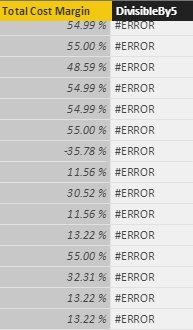
Well it looks right. Can you post a sample of the values in the margin column?
* Matt is an 8 times Microsoft MVP (Power BI) and author of the Power BI Book Supercharge Power BI.
I will not give you bad advice, even if you unknowingly ask for it.
- Mark as New
- Bookmark
- Subscribe
- Mute
- Subscribe to RSS Feed
- Permalink
- Report Inappropriate Content
- Mark as New
- Bookmark
- Subscribe
- Mute
- Subscribe to RSS Feed
- Permalink
- Report Inappropriate Content
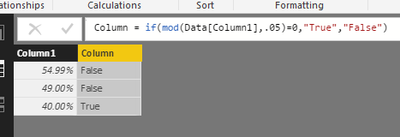
here is my formula and it works fine. So I have to think something strange is happening to your data column. Do you have any rougue values somewhere in the column? Try writing a calc column =Max(table[total cost margin]) and see what you get
* Matt is an 8 times Microsoft MVP (Power BI) and author of the Power BI Book Supercharge Power BI.
I will not give you bad advice, even if you unknowingly ask for it.
- Mark as New
- Bookmark
- Subscribe
- Mute
- Subscribe to RSS Feed
- Permalink
- Report Inappropriate Content
Sale Prices of $0.00 were creating -infinity values which was screwing it up. I stacked another IF statement on top of the other, saying IF([Sale]=0, IF(MOD([Margin], .05) = 0, "True", "False"), "False")
- Mark as New
- Bookmark
- Subscribe
- Mute
- Subscribe to RSS Feed
- Permalink
- Report Inappropriate Content
Hi,
I am looking to find a calculation that will tell me whether an item was sold at a margin divisible by five or not. i.e. ..., 35%, 40%, 45%, 50%, ... etc. I figured it would be simple using the MOD function. I tried each of the following
DivisibleBy5 = IF(MOD([Margin], 0.05) = 0, "Yes", "No")
DivisibleBy5 = IF(MOD([Margin] * 100, 5) = 0, "Yes", "No")
Each give me an error saying "An argument of function 'MOD' has the wrong data type or the result is too large or too small".
My [Margin] is a decimal number and classified as such. Any idea what's going wrong? Any other ways to get the result I'm looking for?
Thanks,
Ryan

- Mark as New
- Bookmark
- Subscribe
- Mute
- Subscribe to RSS Feed
- Permalink
- Report Inappropriate Content
Eg. Column = mod ([margin] , 5)
And what does that show?
- Mark as New
- Bookmark
- Subscribe
- Mute
- Subscribe to RSS Feed
- Permalink
- Report Inappropriate Content
@alanhodgson
That results in an error. "The result of a conversion or arethmatic operation is either too large or too small.
@Phil_Seamark
The calculated column gives me "An argument of function 'MOD' has the wrong data type or the result is too large or too small" again.
- Mark as New
- Bookmark
- Subscribe
- Mute
- Subscribe to RSS Feed
- Permalink
- Report Inappropriate Content


- Mark as New
- Bookmark
- Subscribe
- Mute
- Subscribe to RSS Feed
- Permalink
- Report Inappropriate Content
Hey @Anonymous,
The MOD function can be expressed in terms of the INT function: MOD(n, d) = n - d*INT(n/d)
Try this and see if the same error occurs:
DivisibleBy5 = IF(([Margin] - (0.05)*INT([Margin]/0.05)) = 0, "Yes", "No")
Hope this helps,
Alan
Helpful resources

Power BI Dataviz World Championships
The Power BI Data Visualization World Championships is back! Get ahead of the game and start preparing now!

Power BI Monthly Update - December 2025
Check out the December 2025 Power BI Holiday Recap!

FabCon Atlanta 2026
Join us at FabCon Atlanta, March 16-20, for the ultimate Fabric, Power BI, AI and SQL community-led event. Save $200 with code FABCOMM.

| User | Count |
|---|---|
| 39 | |
| 37 | |
| 33 | |
| 32 | |
| 29 |


| User | Count |
|---|---|
| 133 | |
| 88 | |
| 85 | |
| 68 | |
| 64 |


