cancel
Showing results for 
Search instead for 
Did you mean: 

Learn from the best! Meet the four finalists headed to the FINALS of the Power BI Dataviz World Championships! Register now

Reply
Anonymous
Not applicable

Maps

Hi

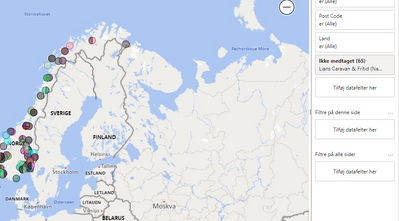
I have created a map from post code and language. I now want to display the name of the customer on the map.

How do I do this ?

BeritMerete_0-1654247816261.png


3 REPLIES 3
Anonymous
Not applicable

Hi @Anonymous ,


To my knowledge, details of Legend could not be shown in each data point in visuals. So I used Tooltips instead.

Eyelyn9_0-1654743554200.png

If you also want this in Power BI, let the power bi community to know this things and give your votes at Power BI site's feedback -  Ideas


Best Regards,
Eyelyn Qin

If this post helps, then please consider Accept it as the solution to help the other members find it more quickly.

Anonymous
Not applicable

Hi @Anonymous ,


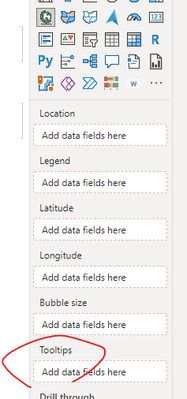
You could directly drag Customer field to Tooltips pane or create a new report page for tooltips.


Eyelyn9_0-1654488059521.png


Best Regards,
Eyelyn Qin
If this post helps, then please consider Accept it as the solution to help the other members find it more quickly.

Anonymous
Not applicable

No, I have the name in legend. I want to show the name on the map without scrolling over the bubble.

Helpful resources

Announcements
Join our Fabric User Panel

Join our Fabric User Panel

Share feedback directly with Fabric product managers, participate in targeted research studies and influence the Fabric roadmap.

February Power BI Update Carousel

Power BI Monthly Update - February 2026

Check out the February 2026 Power BI update to learn about new features.