cancel
Showing results for 
Search instead for 
Did you mean: 

Get Fabric Certified for FREE during Fabric Data Days. Don't miss your chance! Request now

Reply
Anonymous
Not applicable

Map visualization - appearance of selected items only

Dear Community,


I have ~2000 location points on a map visualization (quite a mess), which are relating to transport routes. In the same time I also have a table of transport route data.


Is it possible, that only those location points are visible, which are seleted on the table (e.g. click on transport route ID)? This would mean that the map would appear as empty at the beginning.


Thank you for your help in advance!


Peter

1 ACCEPTED SOLUTION
Anonymous
Not applicable

Hi @Anonymous ,


Make sure there's no active relationship between these two tables.

Then create a measure as below.

Measure = IF(ISFILTERED('Table 2'[location]),IF(SELECTEDVALUE('Table'[location]) in VALUES('Table 2'[location]),1,0),0)

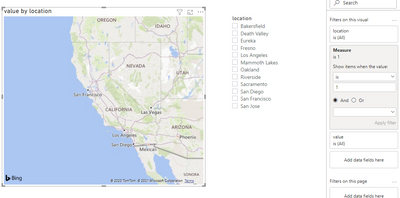
And add this measure to the visual level filter.

Result would be shown as below.

 1.PNG2.PNG


Best Regards,

Jay

View solution in original post

4 REPLIES 4
Anonymous
Not applicable

Hi @Anonymous ,


Make sure there's no active relationship between these two tables.

Then create a measure as below.

Measure = IF(ISFILTERED('Table 2'[location]),IF(SELECTEDVALUE('Table'[location]) in VALUES('Table 2'[location]),1,0),0)

And add this measure to the visual level filter.

Result would be shown as below.

 1.PNG2.PNG


Best Regards,

Jay

amitchandak
Super User
Super User

@Anonymous , you can try with is filtered or has one value

Check video for reference

A new measure like this https://www.youtube.com/watch?v=hXg3kRFSGjA


if(isfiltered(Table[route]) , [Measure], blank())


refer: https://powerpivotpro.com/2013/03/hasonevalue-vs-isfiltered-vs-hasonefilter/

Share with Power BI Enthusiasts: Full Power BI Video (20 Hours) YouTube
Microsoft Fabric Series 60+ Videos YouTube
Microsoft Fabric Hindi End to End YouTube
Anonymous
Not applicable

Hi @amitchandak ,


we are close with the isfiltered function! 🙂


In your suggested formula if(isfiltered(Table[route]) , [Measure], blank() --> what kind of measure can provide multiple rows of the location ID column as result?


In my use case it is important, because for a selected transport route at least 2 (pick-up and delviery) locations are relating.


Thank you very much in advance!


Peter

AllisonKennedy
Super User
Super User

@Anonymous  How many items do you want them to be able to select in the table? This should work by default except for the part about the map being empty at the beginning. You may just need to Edit Interactions and set the map to Filter when a table row/item is selected. 


Getting it empty at the beginning can be done with a measure, but then you need to define how many points can be selected and still not have an empty map - all but one? just one? 


Please @mention me in your reply if you want a response.

Copying DAX from this post? Click here for a hack to quickly replace it with your own table names

Has this post solved your problem? Please Accept as Solution so that others can find it quickly and to let the community know your problem has been solved.
If you found this post helpful, please give Kudos C

I work as a Microsoft trainer and consultant, specialising in Power BI and Power Query.
www.excelwithallison.com

Helpful resources

Announcements
November Power BI Update Carousel

Power BI Monthly Update - November 2025

Check out the November 2025 Power BI update to learn about new features.

Fabric Data Days Carousel

Fabric Data Days

Advance your Data & AI career with 50 days of live learning, contests, hands-on challenges, study groups & certifications and more!

FabCon Atlanta 2026 carousel

FabCon Atlanta 2026

Join us at FabCon Atlanta, March 16-20, for the ultimate Fabric, Power BI, AI and SQL community-led event. Save $200 with code FABCOMM.

Top Solution Authors
Top Kudoed Authors