Don't miss your chance to take the Fabric Data Engineer (DP-600) exam for FREE! Find out how by attending the DP-600 session on April 23rd (pacific time), live or on-demand.
Learn moreNext up in the FabCon + SQLCon recap series: The roadmap for Microsoft SQL and Maximizing Developer experiences in Fabric. All sessions are available on-demand after the live show. Register now
Hi all,
Another one that should be very simple but we are struggling with.
We are using at this stage, the 'Map' visual, for our data samples, the ARCGIS map wond do just yet (we are at proof of concept stage - not wanting to pay the premium just yet)
I can get the filled map to work when its just state and country combined as '[State], [Country]'
But we are really interested in getting down to the postcode level.
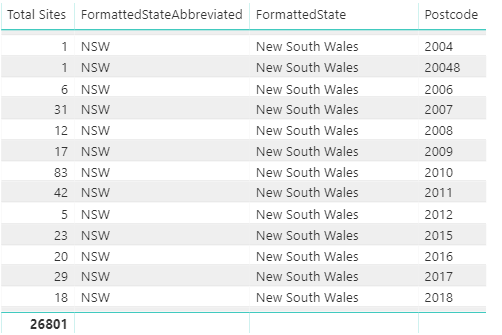
Small sample of the data.
What is the correct notation to supply to the map when we only have postcode, state, and country available?
At this stage our data samples do not provide long/lat.
Could it be that errors in the data throw off the whole thing (see above postcode 20048 - Clearly invalid in Australia)
Any thoughts or tips appreciated.
Hi @andrmh,
Initially, I had same issue however I got a soultion for us all by using Map visualization.
Steps:
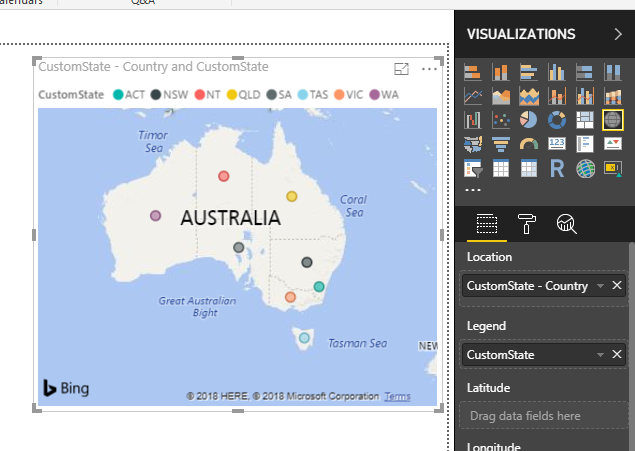
- Create a custom column by concatenating state and country. eg: CustomState - Country
- For above custom column, set Data Category = Place
- Under visualizations, Select "Map"
- Drag "CustomState - Country " field to location.
Please see below screen for more details:
Hope it solves your issue.
Cheers,
Archie1
You may take a look at Tips and tricks for Power BI map visualizations.
I've since read https://community.powerbi.com/t5/Desktop/Problem-with-map-and-postal-code/m-p/11072#M2409
and it was not able to solve my problem.
I have since tried combinations of:
country, postcode
postcode, country
postcode
a 'upside down' hierarchy of postcode, state, country
postcode, state, country
state, postcode, country
country, postcode, state
None of these combinations seem to work.
The result is a little better (though still not correct)
when I add state as the top level, and drill down into postcode
when i drill strange things happen that put 2000 in europe, not over Sydney, even though the state was 'New South Wales'
I suspect something is wrong with bing maps. Not sure what.
The ESRI solutions is superior functionally, however at its price points and for our data samples clipping the 1500 plot limit, its not an option.
If anyone is able to shed any light on this it'd be appreciated.
Thanks
If you have recently started exploring Fabric, we'd love to hear how it's going. Your feedback can help with product improvements.
A new Power BI DataViz World Championship is coming this June! Don't miss out on submitting your entry.
Experience the highlights from FabCon & SQLCon, available live and on-demand starting April 14th.
| User | Count |
|---|---|
| 47 | |
| 44 | |
| 40 | |
| 20 | |
| 15 |
| User | Count |
|---|---|
| 70 | |
| 68 | |
| 32 | |
| 27 | |
| 25 |