Join us at FabCon Atlanta from March 16 - 20, 2026, for the ultimate Fabric, Power BI, AI and SQL community-led event. Save $200 with code FABCOMM.
Register now!The Power BI Data Visualization World Championships is back! It's time to submit your entry. Live now!
Hello Experts,
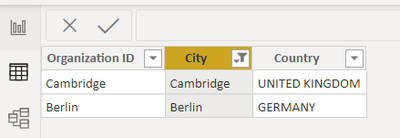
I observed Incorrect Location reflecting in Power BI - Map Visualizations. Values are maintained properly, with 2 columns (Country and City)
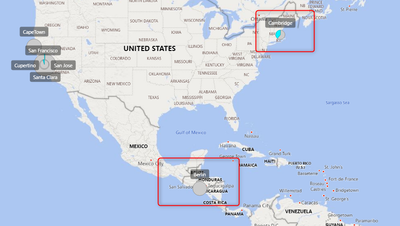
But the map reflecting Cambridge USA and Berlin in El Salvador. How do I fix this
Solved! Go to Solution.
@Anonymous , Create a new column
Location = [City] + " " + [Country]
and try this in your visual as location
also refer:https://www.youtube.com/watch?v=fhyfXcsXI9c
@Anonymous , Create a new column
Location = [City] + " " + [Country]
and try this in your visual as location
also refer:https://www.youtube.com/watch?v=fhyfXcsXI9c
The Power BI Data Visualization World Championships is back! It's time to submit your entry.
Check out the January 2026 Power BI update to learn about new features.
| User | Count |
|---|---|
| 61 | |
| 48 | |
| 35 | |
| 25 | |
| 23 |
| User | Count |
|---|---|
| 142 | |
| 111 | |
| 65 | |
| 38 | |
| 33 |