cancel
Showing results for 
Search instead for 
Did you mean: 

The Power BI Data Visualization World Championships is back! Get ahead of the game and start preparing now! Learn more

Reply
victoriavd
Frequent Visitor

Map Issues Russia

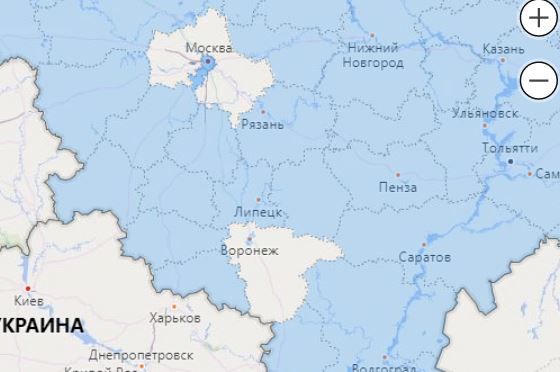
Hi I am facing the folowing issue when ussing filled maps with Russian regions- "Москва" (Moscow) is replaced with "Московская область" (Moscow region) in terms of geographical borders. I.e. I see Moscow istead of Moscow region 

The same issue with "Воронеж", ( Voronezh) "Воронежская область" ( Voronezh region)

My data has only the regions in it.

Thanks it advance for your assistance

Capture.JPG

1 ACCEPTED SOLUTION
v-yuta-msft
Community Support
Community Support

@victoriavd ,


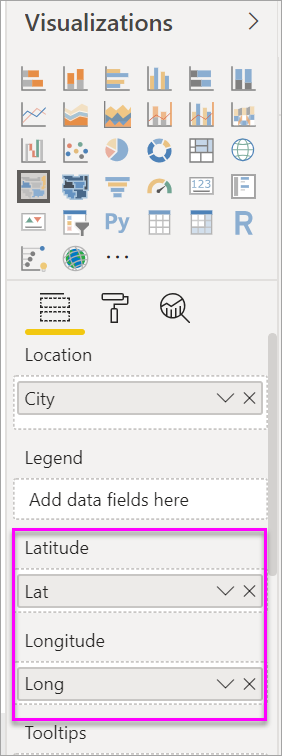
'Moscow' and 'Moscow Region' should be ambiguous in map. Have you tried add latitude and longitude data? The latitude and longitude data will be located precisely.

pbi-latitude.png 


For more details, please refer to doc below:

https://docs.microsoft.com/en-us/power-bi/visuals/power-bi-visualization-filled-maps-choropleths#con...


Regards,

Jimmy Tao

View solution in original post

1 REPLY 1
v-yuta-msft
Community Support
Community Support

@victoriavd ,


'Moscow' and 'Moscow Region' should be ambiguous in map. Have you tried add latitude and longitude data? The latitude and longitude data will be located precisely.

pbi-latitude.png 


For more details, please refer to doc below:

https://docs.microsoft.com/en-us/power-bi/visuals/power-bi-visualization-filled-maps-choropleths#con...


Regards,

Jimmy Tao

Helpful resources

Announcements
Power BI DataViz World Championships

Power BI Dataviz World Championships

The Power BI Data Visualization World Championships is back! Get ahead of the game and start preparing now!

December 2025 Power BI Update Carousel

Power BI Monthly Update - December 2025

Check out the December 2025 Power BI Holiday Recap!

FabCon Atlanta 2026 carousel

FabCon Atlanta 2026

Join us at FabCon Atlanta, March 16-20, for the ultimate Fabric, Power BI, AI and SQL community-led event. Save $200 with code FABCOMM.