Hi,
I'm trying to make a JOIN of sorts happen, but even though my tables have a column with the same name and type it is not recognized as a common join (see pictures). I've tried working around it but according to what I've read so far this should just work.
Some background information; I have one table, schedule, which contains the schedules of the employees. I also have one table containing the exact time they started their shift, this is timeregistration. These 2 are to be linked on EmployeeID and the datetime to which they are closest. As I'm still working on the first part I haven't woried about the closest datetime as of yet, but aditional feedback or suggestions would always be appreciated.
I have made this query work in SQL (my connection is to a Azure SQL server) and it looks like this:
SELECT	tr.Employee_EmployeeID, tr.RawStartTime, p.StartDateTime,
		(DATEDIFF(MINUTE,tr.RawStartTime, p.StartDateTime)) as diff
FROM bigkiki.timeregistration tr
JOIN bigkiki.actual p --Join on EmployeeID
	ON tr.Employee_EmployeeID = p.Employee_EmployeeID
WHERE	3600 >= DATEDIFF(SECOND, tr.RawStartTime, p.StartDateTime) -- Diffrence smaller then 1 hour
AND		-3600 <= DATEDIFF(SECOND, tr.RawStartTime, p.StartDateTime) -- Diffrence larger then -1 hour
ORDER BY tr.RawStartTime;
Any help would be greatly appreciated.
With kind regards,
Martien
(edit: there is more data then the rows shown in the screenshots, so that is not forming I problem, I think)
 My Join
 Connection
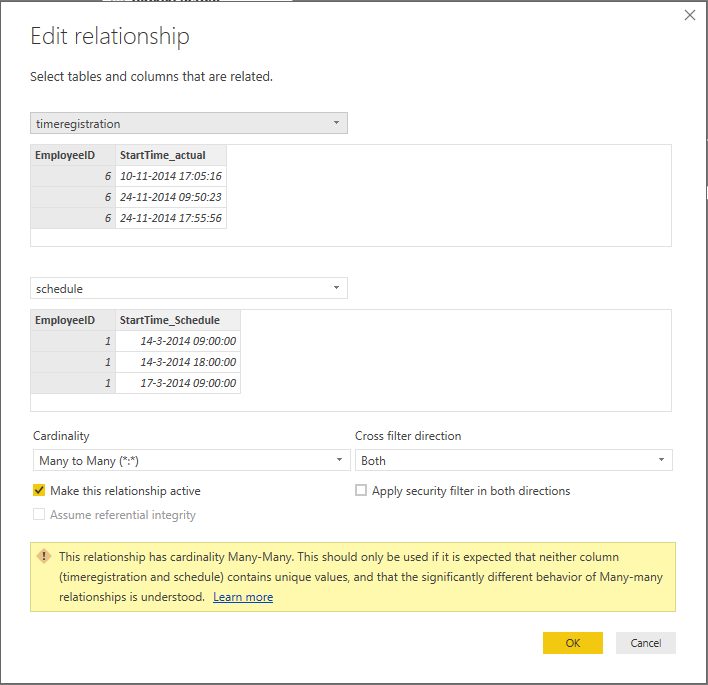 My relationship
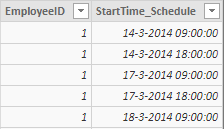 Schedule
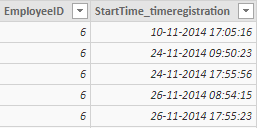 Timeregistration


