cancel
Showing results for 
Search instead for 
Did you mean: 

Learn from the best! Meet the four finalists headed to the FINALS of the Power BI Dataviz World Championships! Register now

Reply
Netshi
New Member

Many To Many relationship

Hi all,

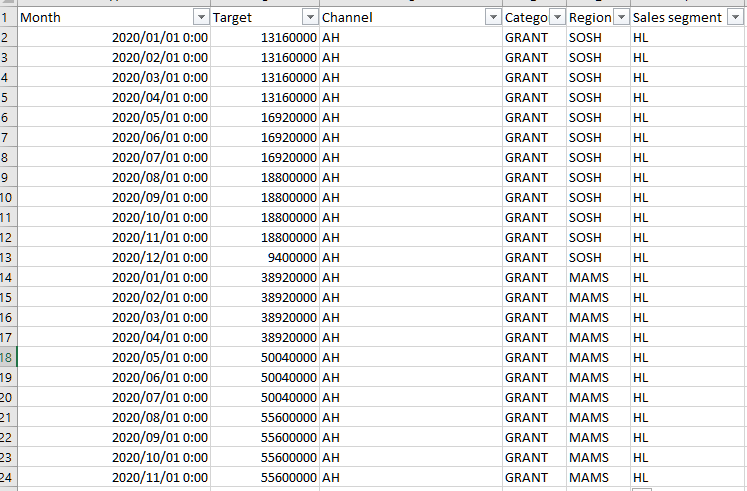
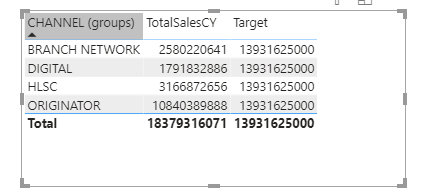
Kindly assist, I'm still new to Power BI. I'm trying to read the targets from Target's table to the 2020 sales but I'm not getting the desired/unique results.

The targets are per Month, per Category, per Region, per Channel and I'm struggling to get unique values for this.

TargetFileTargetFile


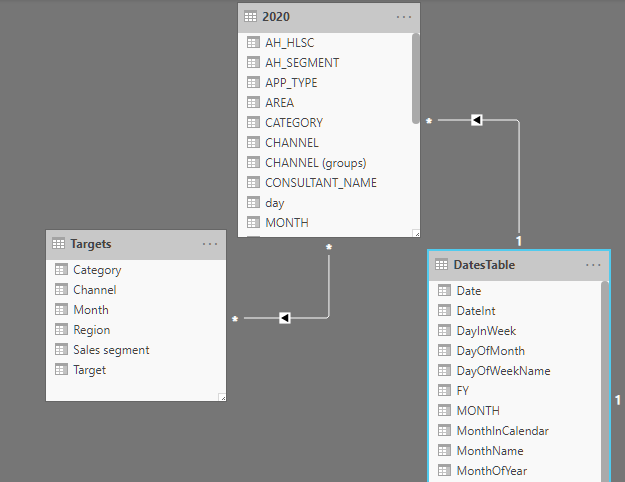
TablesTables

I have tried linking the 2020 table with Targets table using the "MONTH" field but the results are the same,

VVisVVis

1 REPLY 1
vanessafvg
Community Champion
Community Champion

what is the relationship between?  you need to create the relationship on channel between 2020 and targets, the date table should be linked separately to the target, not through 2020, and it would be better to have a lookup table called channel and then you link both the target and 2020 to that table.


If I took the time to answer your question and I came up with a solution, please mark my post as a solution and /or give kudos freely for the effort 🙂 Thank you!

Proud to be a Super User!


Helpful resources

Announcements
New to Fabric survey Carousel

New to Fabric Survey

If you have recently started exploring Fabric, we'd love to hear how it's going. Your feedback can help with product improvements.

Power BI DataViz World Championships carousel

Power BI DataViz World Championships - June 2026

A new Power BI DataViz World Championship is coming this June! Don't miss out on submitting your entry.

Join our Fabric User Panel

Join our Fabric User Panel

Share feedback directly with Fabric product managers, participate in targeted research studies and influence the Fabric roadmap.

March Power BI Update Carousel

Power BI Community Update - March 2026

Check out the March 2026 Power BI update to learn about new features.