Share feedback directly with Fabric product managers, participate in targeted research studies and influence the Fabric roadmap.
Sign up nowGet Fabric certified for FREE! Don't miss your chance! Learn more
Hi All,
I have two files where one is coming from direct sql query and other one is a excel file. Power BI automatically creates Many to many relationship but still when i try to create table i get duplicates in quota column. I am completely new to power BI and not understanding why is this happening. I have also attached the sample pbix file here.
Solved! Go to Solution.
if you are new to Power BI, you shouldn't use Many to Many relationship.
You can try to turn it to One to Many relationship by creating 2 Dimension tables:
Table 2 = DISTINCT(UNION(VALUES(Sheet1[MONTH]), VALUES('Sheet1 (2)'[Month])))Table = DISTINCT(UNION(VALUES(Sheet1[CL_KEY]), VALUES('Sheet1 (2)'[CL_KEY])))then use that 2 tables link to the fact table.
you can check PBI file here:
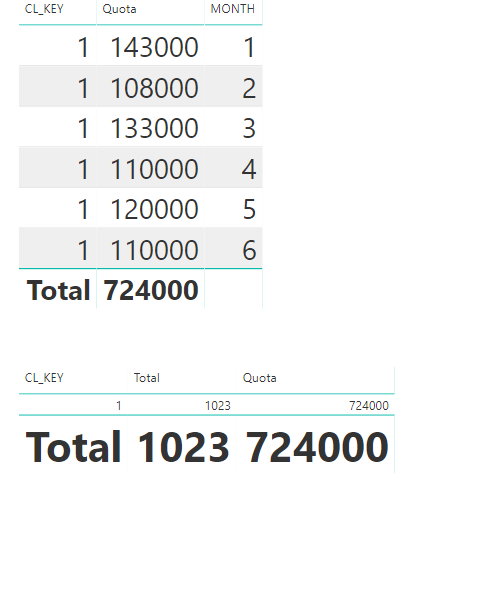
Actually, the power bi reads the quota you have on your database per month. If you will remove the month, this will show:
if you are new to Power BI, you shouldn't use Many to Many relationship.
You can try to turn it to One to Many relationship by creating 2 Dimension tables:
Table 2 = DISTINCT(UNION(VALUES(Sheet1[MONTH]), VALUES('Sheet1 (2)'[Month])))Table = DISTINCT(UNION(VALUES(Sheet1[CL_KEY]), VALUES('Sheet1 (2)'[CL_KEY])))then use that 2 tables link to the fact table.
you can check PBI file here:
If you love stickers, then you will definitely want to check out our Community Sticker Challenge!
Check out the January 2026 Power BI update to learn about new features.
| User | Count |
|---|---|
| 64 | |
| 63 | |
| 49 | |
| 21 | |
| 18 |
| User | Count |
|---|---|
| 121 | |
| 118 | |
| 38 | |
| 36 | |
| 29 |