cancel
Showing results for 
Search instead for 
Did you mean: 

The Power BI Data Visualization World Championships is back! Get ahead of the game and start preparing now! Learn more

Reply
BenEaton
Frequent Visitor

Manning Forecast

Hello all!


I'm looking to create a forecast of the manning level in my organisation over a couple of years, taking into account fixed term contracts.  I have their names, join date and projected contract end date in a table that looks like this:


Screenshot.png If anyone could help me out that would be great - new to Power BI this week and want to demonstrate how it can be of use to the company!


Many thanks

2 ACCEPTED SOLUTIONS
v-qiuyu-msft
Community Support
Community Support

Hi @BenEaton,


If I understood you correctly, you want to calculate the number of stilled working employees, right?


You can create a calendar table:


Calendar = CALENDAR(MIN('Table1'[Join]),MAX('Table1'[End]))


Then create a measure in Table1:

Still Employed = COUNTAX(FILTER(ALL(Table1),[End]>=MAX([End])),[Name])


Create a new table:

Table = DISTINCT(SELECTCOLUMNS('Calendar',"Date",[Date],"Still Employeed",COUNTAX(FILTER(ALL(Table1),[End]>=EARLIER('Calendar'[Date])),[Name])))


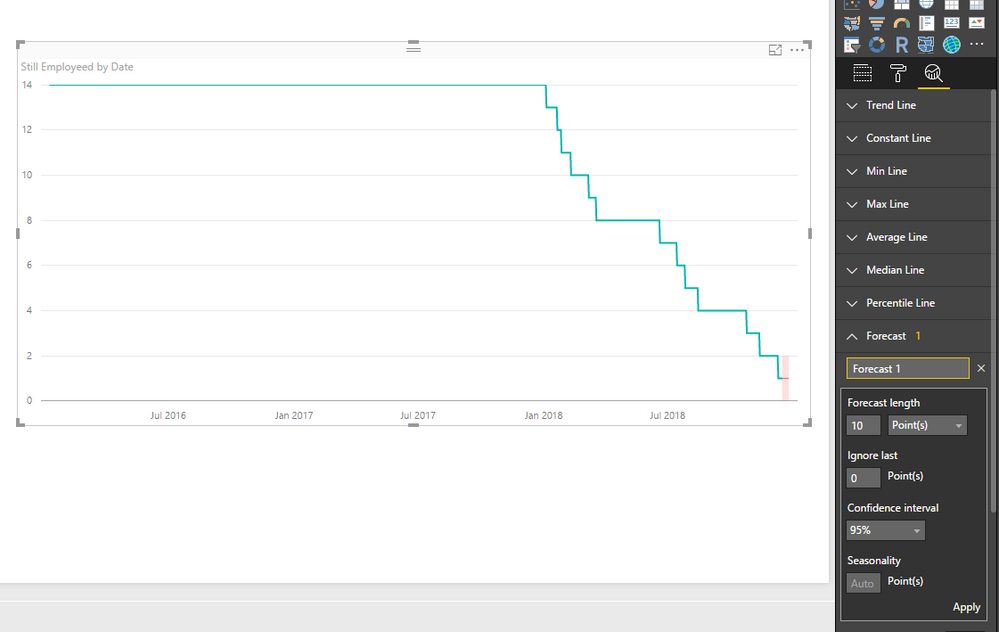
Add a forecast line to the line chart.


q3.PNG


Best Regards,
Qiuyun Yu


Community Support Team _ Qiuyun Yu
If this post helps, then please consider Accept it as the solution to help the other members find it more quickly.

View solution in original post

I might have figured it out as COUNTAX(FILTER(Plot,[Join]<=EARLIER(Calendar[Date]) && [End]>=EARLIER(Calendar[Date]))), it appears to show what I need it to!  I am still a bit confused about the use of EARLIER, but it does what I need it to and some more playing with the expression might be more revealing.


Many thanks @v-qiuyu-msft for a bit of guided learning!  If there's a more logical way of writing what I have written please let me know!  If only now I can add a slicer I'm fully set!


Ben


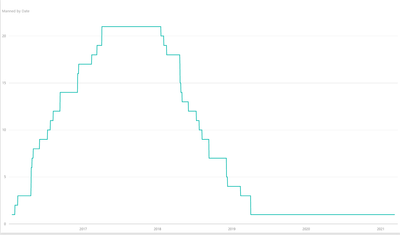
Manning Forecast.png

View solution in original post

3 REPLIES 3
v-qiuyu-msft
Community Support
Community Support

Hi @BenEaton,


If I understood you correctly, you want to calculate the number of stilled working employees, right?


You can create a calendar table:


Calendar = CALENDAR(MIN('Table1'[Join]),MAX('Table1'[End]))


Then create a measure in Table1:

Still Employed = COUNTAX(FILTER(ALL(Table1),[End]>=MAX([End])),[Name])


Create a new table:

Table = DISTINCT(SELECTCOLUMNS('Calendar',"Date",[Date],"Still Employeed",COUNTAX(FILTER(ALL(Table1),[End]>=EARLIER('Calendar'[Date])),[Name])))


Add a forecast line to the line chart.


q3.PNG


Best Regards,
Qiuyun Yu


Community Support Team _ Qiuyun Yu
If this post helps, then please consider Accept it as the solution to help the other members find it more quickly.

Hi @v-qiuyu-msft,


Many thanks, that's brilliant.  What I am trying to work out now is how to take into account the join date - as the line chart only takes into account end date and the starting line is simply the sum of all employees in the data, regardless of join date.


I think it's to do with COUNTAX(FILTER(ALL(Table1),[End]>=EARLIER('Calendar'[Date])) only referencing [end], not [Join].  At the moment trying to find a way to express almost a "between"!

I might have figured it out as COUNTAX(FILTER(Plot,[Join]<=EARLIER(Calendar[Date]) && [End]>=EARLIER(Calendar[Date]))), it appears to show what I need it to!  I am still a bit confused about the use of EARLIER, but it does what I need it to and some more playing with the expression might be more revealing.


Many thanks @v-qiuyu-msft for a bit of guided learning!  If there's a more logical way of writing what I have written please let me know!  If only now I can add a slicer I'm fully set!


Ben


Manning Forecast.png

Helpful resources

Announcements
Power BI DataViz World Championships

Power BI Dataviz World Championships

The Power BI Data Visualization World Championships is back! Get ahead of the game and start preparing now!

December 2025 Power BI Update Carousel

Power BI Monthly Update - December 2025

Check out the December 2025 Power BI Holiday Recap!

FabCon Atlanta 2026 carousel

FabCon Atlanta 2026

Join us at FabCon Atlanta, March 16-20, for the ultimate Fabric, Power BI, AI and SQL community-led event. Save $200 with code FABCOMM.