Join us at FabCon Atlanta from March 16 - 20, 2026, for the ultimate Fabric, Power BI, AI and SQL community-led event. Save $200 with code FABCOMM.
Register now!The Power BI Data Visualization World Championships is back! Get ahead of the game and start preparing now! Learn more
Hi All,
I like the search text box functionality because it lets me rapidly locate an item instead of having to scroll down hundres of rows of information.
However, looking at how my users have been using the reports, I have the following observations:
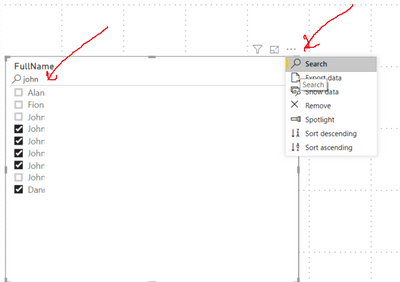
Problem 1 - They are often not aware they need to click on the "magnifying glass" icon on the top right to bring up the Search text box functionality
Problem 2 - Even after the Search text box is up, the users often do not realize that there is a Text box where they can type a key word. I guess this boils down to poor contrast between itself and the ambience, lack of tooltip or some grayed out text that would draw the attention of the user.
Any suggestions?
Thanks,
Sau
Solved! Go to Solution.
Hi @Anonymous,
Yes, current the search feature may not humanize enough to achieve your requirements.
Perhaps you can try to use the custom text filter visuals or try to submit ideas to help improve these features.
Power BI Ideas
Regards,
Xiaoxin Sheng
Hi @Anonymous,
Yes, current the search feature may not humanize enough to achieve your requirements.
Perhaps you can try to use the custom text filter visuals or try to submit ideas to help improve these features.
Power BI Ideas
Regards,
Xiaoxin Sheng
Hello @Anonymous ,
Thanks for pointing to the Text Filter component from Microsoft. This was really helpful.
Great insight. You should raise an idea on ideas.powerbi.com for that.
The Power BI Data Visualization World Championships is back! Get ahead of the game and start preparing now!
Check out the November 2025 Power BI update to learn about new features.
| User | Count |
|---|---|
| 59 | |
| 46 | |
| 42 | |
| 23 | |
| 18 |
| User | Count |
|---|---|
| 193 | |
| 124 | |
| 101 | |
| 67 | |
| 49 |