Join us at FabCon Atlanta from March 16 - 20, 2026, for the ultimate Fabric, Power BI, AI and SQL community-led event. Save $200 with code FABCOMM.
Register now!Get Fabric Certified for FREE during Fabric Data Days. Don't miss your chance! Request now
Table.Pivot(Table.TransformColumnTypes(#"Filtered Rows2", {{"created", type text}}), List.Distinct(Table.TransformColumnTypes(#"Filtered Rows2", {{"created", type text}})[created]), "created", "userID", List.Count)
Would anyone be able to tell me how to make this pivoted table show a running total?
Currently it has the country of an entry in the rows and the date in the columns...
| Country | 1/1/19 | 2/1/19 | 3/1/19 | 4/1/19 | 5/1/19 |
| GB | 0 | 0 | 0 | 1 | 0 |
| NL | 1 | 1 | 0 | 0 | 0 |
| CA | 0 | 1 | 2 | 0 | 0 |
I would like it to look like this...
| Country | 1/1/19 | 2/1/19 | 3/1/19 | 4/1/19 | 5/1/19 |
| GB | 0 | 0 | 0 | 1 | 1 |
| NL | 1 | 2 | 2 | 2 | 2 |
| CA | 0 | 1 | 3 | 3 | 3 |
Solved! Go to Solution.
Hi @Anonymous ,
You can download my proposed solution from here.
Here are the steps:
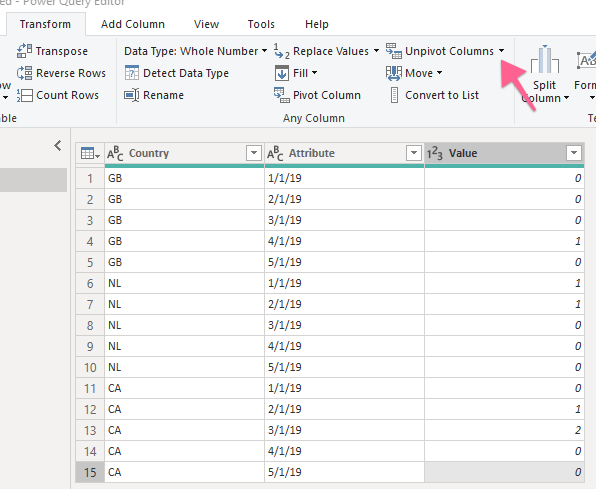
1) Unpivot the dates in Power Query to have a table as below
2) Add a measure for the cumulated value
Cumulated value =
var selectedDate = LASTDATE('Countries'[Date])
RETURN
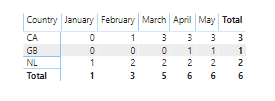
CALCULATE(SUM('Countries'[Value]), 'Countries'[Date]<=selectedDate, ALLEXCEPT('Countries',Countries[Country]))Here is a screenshot of the final table:
Is this what you are looking for?
LC
Interested in Power BI and DAX tutorials? Check out my blog at www.finance-bi.com
Hi @Anonymous ,
You can download my proposed solution from here.
Here are the steps:
1) Unpivot the dates in Power Query to have a table as below
2) Add a measure for the cumulated value
Cumulated value =
var selectedDate = LASTDATE('Countries'[Date])
RETURN
CALCULATE(SUM('Countries'[Value]), 'Countries'[Date]<=selectedDate, ALLEXCEPT('Countries',Countries[Country]))Here is a screenshot of the final table:
Is this what you are looking for?
LC
Interested in Power BI and DAX tutorials? Check out my blog at www.finance-bi.com
Check out the November 2025 Power BI update to learn about new features.
Advance your Data & AI career with 50 days of live learning, contests, hands-on challenges, study groups & certifications and more!