Join us at FabCon Atlanta from March 16 - 20, 2026, for the ultimate Fabric, Power BI, AI and SQL community-led event. Save $200 with code FABCOMM.
Register now!The Power BI Data Visualization World Championships is back! Get ahead of the game and start preparing now! Learn more
Hi.
I've read a few threads about this issue but can not find a solution for my problem.
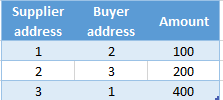
I have two tables :
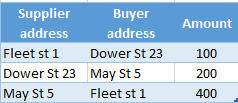
I want to show a table visual with Supplier address, Buyer address and Amount. I have active relationship ID-to-Supplier address. How do I get address for the Buyer, please? I read about USERELATIONSHIP, it says it needs an expression as the first parameter. What kind of expression do I put in USERELATIONSHIP in order to get to desired result? My result table should look like this:
Solved! Go to Solution.
Hi @gvg,
You can achieve this without user relationship since you want to return the value of specif address you can create a measure or column with the following:
MEASURE = LOOKUPVALUE(Adress[Adress],Adress[ID],MAX(Data[Buyer adress]))
COLUMN = LOOKUPVALUE(Adress[Adress],Adress[ID],Data[Buyer adress])
Taknig into account good practices and and that a calculated column uses space on your model if you can replace the column by a measure I would use the measure.
Regards,
MFelix
Regards
Miguel Félix
Proud to be a Super User!
Check out my blog: Power BI em PortuguêsHi @gvg,
You can achieve this without user relationship since you want to return the value of specif address you can create a measure or column with the following:
MEASURE = LOOKUPVALUE(Adress[Adress],Adress[ID],MAX(Data[Buyer adress]))
COLUMN = LOOKUPVALUE(Adress[Adress],Adress[ID],Data[Buyer adress])
Taknig into account good practices and and that a calculated column uses space on your model if you can replace the column by a measure I would use the measure.
Regards,
MFelix
Regards
Miguel Félix
Proud to be a Super User!
Check out my blog: Power BI em PortuguêsYes, this works just fine. Thanks!
The Power BI Data Visualization World Championships is back! Get ahead of the game and start preparing now!
| User | Count |
|---|---|
| 40 | |
| 35 | |
| 34 | |
| 31 | |
| 28 |
| User | Count |
|---|---|
| 137 | |
| 102 | |
| 71 | |
| 67 | |
| 65 |