Join us at FabCon Atlanta from March 16 - 20, 2026, for the ultimate Fabric, Power BI, AI and SQL community-led event. Save $200 with code FABCOMM.
Register now!The Power BI Data Visualization World Championships is back! It's time to submit your entry. Live now!
Hi.
I've read a few threads about this issue but can not find a solution for my problem.
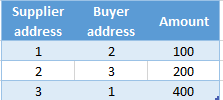
I have two tables :
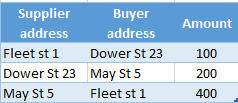
I want to show a table visual with Supplier address, Buyer address and Amount. I have active relationship ID-to-Supplier address. How do I get address for the Buyer, please? I read about USERELATIONSHIP, it says it needs an expression as the first parameter. What kind of expression do I put in USERELATIONSHIP in order to get to desired result? My result table should look like this:
Solved! Go to Solution.
Hi @gvg,
You can achieve this without user relationship since you want to return the value of specif address you can create a measure or column with the following:
MEASURE = LOOKUPVALUE(Adress[Adress],Adress[ID],MAX(Data[Buyer adress]))
COLUMN = LOOKUPVALUE(Adress[Adress],Adress[ID],Data[Buyer adress])
Taknig into account good practices and and that a calculated column uses space on your model if you can replace the column by a measure I would use the measure.
Regards,
MFelix
Regards
Miguel Félix
Proud to be a Super User!
Check out my blog: Power BI em PortuguêsHi @gvg,
You can achieve this without user relationship since you want to return the value of specif address you can create a measure or column with the following:
MEASURE = LOOKUPVALUE(Adress[Adress],Adress[ID],MAX(Data[Buyer adress]))
COLUMN = LOOKUPVALUE(Adress[Adress],Adress[ID],Data[Buyer adress])
Taknig into account good practices and and that a calculated column uses space on your model if you can replace the column by a measure I would use the measure.
Regards,
MFelix
Regards
Miguel Félix
Proud to be a Super User!
Check out my blog: Power BI em PortuguêsYes, this works just fine. Thanks!
The Power BI Data Visualization World Championships is back! It's time to submit your entry.
Check out the January 2026 Power BI update to learn about new features.
| User | Count |
|---|---|
| 56 | |
| 40 | |
| 38 | |
| 21 | |
| 21 |
| User | Count |
|---|---|
| 141 | |
| 103 | |
| 63 | |
| 36 | |
| 35 |