cancel
Showing results for 
Search instead for 
Did you mean: 

Vote for your favorite vizzies from the Power BI Dataviz World Championship submissions. Vote now!

Reply
Anonymous
Not applicable

Making an error report

Hi.

Here in my job supervisors must fill some "work permission" in order to do some kind of works, such as working at height, use of hazardous substances, etc. 

Once a month, we check those permissions searching for errors and upload them in a forms. In order to visualice them, I'm trying to create a power bi with some pie charts.


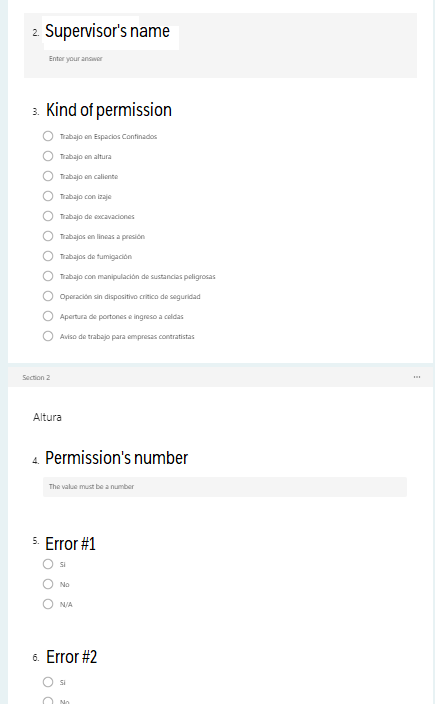
First, we have 11 kinds of permissions. Every kind of permission has around 8 to 11 possible errors that we check in the forms as "sí", "no", or "N/A" if it's not required. 

Untitled.png


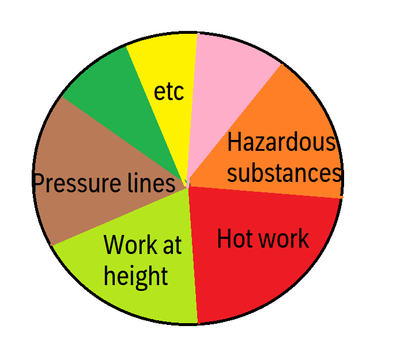
So, first I need a pie chart that shows how many of those permissions has at least 1 error. Something like this: 

tomasferro99_1-1675954454802.png

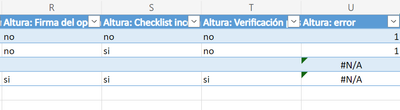
I've added a column in the excel that gives me a 1 if the permission has any error on it like this:

tomasferro99_2-1675954522447.png


So if I have any error on a permission, it gives me a 1, and if It has no errors on it, It gives me a #N/A.


I've already uploaded the excel to PowerBI, but I dont know how can I make the pie chart, I've been trying to watch tutorials and videos but nothing seems to fit me.

How can I do the pie chart with this form? Do I need to modify anything on the excel?


Thanks in advance!

0 REPLIES 0

Helpful resources

Announcements
Power BI DataViz World Championships

Power BI Dataviz World Championships

Vote for your favorite vizzies from the Power BI World Championship submissions!

Sticker Challenge 2026 Carousel

Join our Community Sticker Challenge 2026

If you love stickers, then you will definitely want to check out our Community Sticker Challenge!

January Power BI Update Carousel

Power BI Monthly Update - January 2026

Check out the January 2026 Power BI update to learn about new features.

FabCon Atlanta 2026 carousel

FabCon Atlanta 2026

Join us at FabCon Atlanta, March 16-20, for the ultimate Fabric, Power BI, AI and SQL community-led event. Save $200 with code FABCOMM.