Join us at FabCon Atlanta from March 16 - 20, 2026, for the ultimate Fabric, Power BI, AI and SQL community-led event. Save $200 with code FABCOMM.
Register now!The Power BI Data Visualization World Championships is back! Get ahead of the game and start preparing now! Learn more
Hello,
Sample Data:
| courseid | userid | fullname | completion_state | division |
| 1 | 1 | Reading course | finished | AAA |
| 1 | 2 | Reading course | Not finish | AAA |
| 1 | 3 | Reading course | Not finish | BBB |
| 1 | 4 | Reading course | Not finish | CCC |
| 1 | 5 | Reading course | Not finish | DDD |
| 2 | 1 | Practical | Not finish | AAA |
| 2 | 2 | Practical | Not finish | AAA |
| 2 | 3 | Practical | finished | BBB |
| 2 | 4 | Practical | Not finish | CCC |
| 2 | 5 | Practical | Not finish | DDD
|
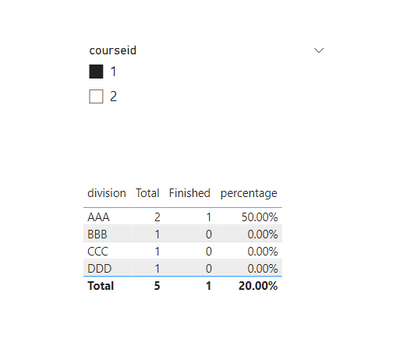
with filter courseid = 1:
| division | total | finished | percentage |
| AAA | 2 | 1 | 50% |
| BBB | 1 | 0 | 0% |
| CCC | 1 | 0 | 0% |
| DDD | 1 | 0 | 0% |
with filter courseid = 2:
| division | total | finished | percentage |
| AAA | 2 | 0 | 0% |
| BBB | 1 | 1 | 100% |
| CCC | 1 | 0 | 0% |
| DDD | 1 | 0 | 0%
|
Would anyone help about this situation and suggest me how to create a new table for this?
Thanks!
Solved! Go to Solution.
Hi @briankwlo
You can create the below measures
If this post helps, Accept it as a solution
Hi @briankwlo
You can create the below measures
If this post helps, Accept it as a solution
It's work!
Thank you esha_shah2002!
Have a nice day!
The Power BI Data Visualization World Championships is back! Get ahead of the game and start preparing now!
Check out the November 2025 Power BI update to learn about new features.
| User | Count |
|---|---|
| 63 | |
| 46 | |
| 43 | |
| 26 | |
| 19 |
| User | Count |
|---|---|
| 198 | |
| 125 | |
| 102 | |
| 69 | |
| 53 |