Join us at FabCon Atlanta from March 16 - 20, 2026, for the ultimate Fabric, Power BI, AI and SQL community-led event. Save $200 with code FABCOMM.
Register now!Get Fabric Certified for FREE during Fabric Data Days. Don't miss your chance! Request now
Hello everyone!
I Have the follow problem, I want to do a moving average backwards.
for example, as the table below:
| Date | Value |
| 01/01/2019 | 10 |
| 02/01/2019 | 11 |
| 03/01/2019 | 14 |
| 04/01/2019 | 15 |
| 05/01/2019 | 18 |
| 06/01/2019 | 19 |
| 07/01/2019 | 18 |
| 08/01/2019 | 20 |
| 09/01/2019 | 14 |
| 10/01/2019 | 25 |
So what I want to show is: On date 10/01/2019, the value that must show is 25.
On day 09/01/2019, it must show the average between day 10 and 9, given me a total of 19,5 (That is (20+14)/2)
On day 08/01, it must show an average of the days 10, 9 and 8, given me a total of 19,6 (That is (20+14+25)/3)
On day 07/01 must show the average of the day 10,9,8,7 and so on....
How can I do this?
Thank you!
Solved! Go to Solution.
Hi @Anonymous
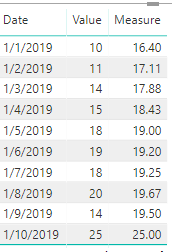
You may create a measure like below:
Measure =
DIVIDE (
CALCULATE (
SUM ( Table2[Value] ),
FILTER ( ALL ( Table2 ), Table2[Date] >= MAX ( Table2[date] ) )
),
COUNTROWS ( FILTER ( ALL ( Table2 ), Table2[Date] >= MAX ( Table2[date] ) ) )
)
Regards,
Cherie
let
Source = Web.Page(Web.Contents("https://community.powerbi.com/t5/Desktop/Making-a-moving-average-backwards/m-p/649510#M311441")),
Data0 = Source{0}[Data],
#"Promoted Headers" = Table.PromoteHeaders(Data0, [PromoteAllScalars=true]),
#"Changed Type" = Table.TransformColumnTypes(#"Promoted Headers",{{"Date", type date}, {"Value", Int64.Type}}),
#"Sorted Rows" = Table.Sort(#"Changed Type",{{"Date", Order.Descending}}),
#"Added Index" = Table.AddIndexColumn(#"Sorted Rows", "Index", 1, 1),
Custom1 = List.Skip(List.Accumulate(#"Added Index"[Value],{0},(state,current)=> state&{List.Last(state)+current})),
Custom2 = Table.FromColumns(Table.ToColumns(#"Added Index")&{Custom1}),
#"Inserted Division" = Table.AddColumn(Custom2, "Moving Average Backwards", each [Column4] / [Column3], type number),
#"Sorted Rows1" = Table.Sort(#"Inserted Division",{{"Column3", Order.Descending}}),
#"Removed Columns" = Table.RemoveColumns(#"Sorted Rows1",{"Column3", "Column4"}),
#"Renamed Columns" = Table.RenameColumns(#"Removed Columns",{{"Column1", "Date"}, {"Column2", "Value"}})
in
#"Renamed Columns"
Hi @Anonymous
You may create a measure like below:
Measure =
DIVIDE (
CALCULATE (
SUM ( Table2[Value] ),
FILTER ( ALL ( Table2 ), Table2[Date] >= MAX ( Table2[date] ) )
),
COUNTROWS ( FILTER ( ALL ( Table2 ), Table2[Date] >= MAX ( Table2[date] ) ) )
)
Regards,
Cherie
Check out the November 2025 Power BI update to learn about new features.
Advance your Data & AI career with 50 days of live learning, contests, hands-on challenges, study groups & certifications and more!