cancel
Showing results for 
Search instead for 
Did you mean: 

The Power BI Data Visualization World Championships is back! Get ahead of the game and start preparing now! Learn more

Reply
Efsteps
Frequent Visitor

Make conditional formatting with text instead of color

Hi to everyone 

I need to make a card visual that shows me text based on a numeric or percentage value 

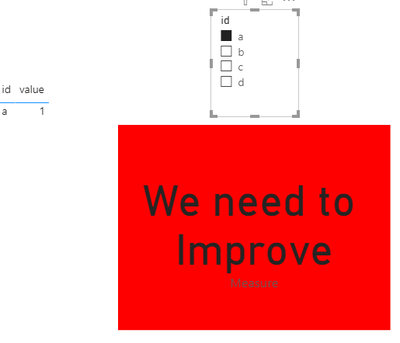
By example if the value is 1 in the card visual appear the text “We need to Improve” or if the value is 5 in the visual card, the text to show is “Great Job!” and if it’s possible at the same time the color text changes with the same conditions.

There’s a way to do it?

Thank you very much for reading!

1 ACCEPTED SOLUTION
Anonymous
Not applicable

Hi @Efsteps ,


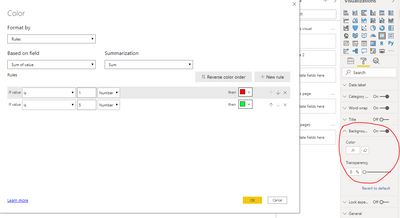
Refer this measure.

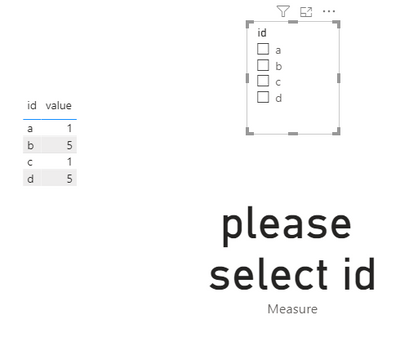
Measure = IF(NOT(ISFILTERED('Table'[id])),"please select id",SWITCH(SELECTEDVALUE('Table'[value]),1,"We need to Improve",5,"Great Job!"))

Here's my sample data.

1.PNG

2.PNG

3.PNG

4.PNG


Best Regards,

Jay


Community Support Team _ Jay Wang

If this post helps, then please consider Accept it as the solution to help the other members find it more quickly.

View solution in original post

3 REPLIES 3
Anonymous
Not applicable

Hi @Efsteps ,


Refer this measure.

Measure = IF(NOT(ISFILTERED('Table'[id])),"please select id",SWITCH(SELECTEDVALUE('Table'[value]),1,"We need to Improve",5,"Great Job!"))

Here's my sample data.

1.PNG

2.PNG

3.PNG

4.PNG


Best Regards,

Jay


Community Support Team _ Jay Wang

If this post helps, then please consider Accept it as the solution to help the other members find it more quickly.

amitchandak
Super User
Super User

@Efsteps , You have create a formula that will return “We need to Improve” and others. Create a same formula, it should return color for that text so when formula returns “We need to Improve”, you return green

Example

color =
switch ( true(),
FIRSTNONBLANK(Table[commodity],"NA") ="commodity1" && sum(Table[Value]) >500,"lightgreen",
FIRSTNONBLANK(Table[commodity],"NA") ="commodity2" && sum(Table[Value]) >1000,"lightgreen",
/// Add more conditions
"red"
)

. In conditional formatting, you can choose field and a color measure post that

Refer for steps

https://radacad.com/dax-and-conditional-formatting-better-together-find-the-biggest-and-smallest-num...
https://docs.microsoft.com/en-us/power-bi/desktop-conditional-table-formatting#color-by-color-values


Share with Power BI Enthusiasts: Full Power BI Video (20 Hours) YouTube
Microsoft Fabric Series 60+ Videos YouTube
Microsoft Fabric Hindi End to End YouTube

How can be the formula taking apart the colors condition, just need to make a value  converted to text?

Helpful resources

Announcements
November Power BI Update Carousel

Power BI Monthly Update - November 2025

Check out the November 2025 Power BI update to learn about new features.

Fabric Data Days Carousel

Fabric Data Days

Advance your Data & AI career with 50 days of live learning, contests, hands-on challenges, study groups & certifications and more!

FabCon Atlanta 2026 carousel

FabCon Atlanta 2026

Join us at FabCon Atlanta, March 16-20, for the ultimate Fabric, Power BI, AI and SQL community-led event. Save $200 with code FABCOMM.