Join us at FabCon Atlanta from March 16 - 20, 2026, for the ultimate Fabric, Power BI, AI and SQL community-led event. Save $200 with code FABCOMM.
Register now!The Power BI Data Visualization World Championships is back! Get ahead of the game and start preparing now! Learn more
Hello,
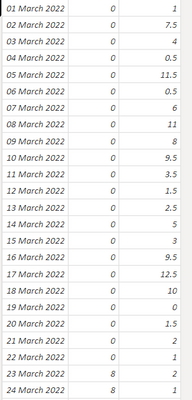
I have data like this:
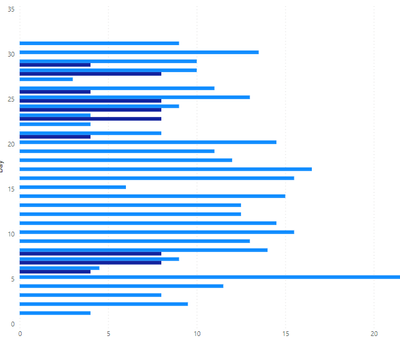
Which is producing a graph like this:
I would like the two colours of blue to be stacked together in a single line. How can I achieve this?
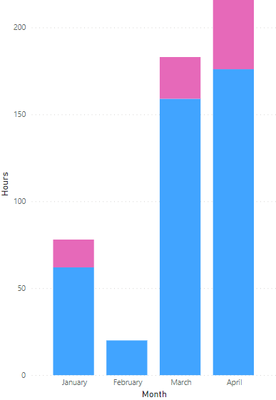
See sample case with wrong orientation:
Solved! Go to Solution.
It eventually just sorted itself, now the graph is displaying correctly.
Hi @Anonymous ,
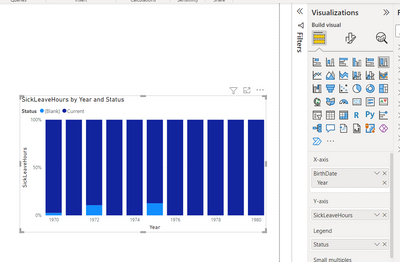
You can try using "100% stacked column chart" ->(it will display something like this - see the screenshot for your reference)
Put your date column(1st column) in X-axis, 3rd column in Y-axis and 2nd column in Legend.
@Anonymous -> Please hit the thumbs up & mark it as solution if this helps you. Thanks.
I need the relative sizes of the bars, so 100% doesn't work.
Try Stacked column charts.
The Power BI Data Visualization World Championships is back! Get ahead of the game and start preparing now!
Check out the November 2025 Power BI update to learn about new features.
| User | Count |
|---|---|
| 59 | |
| 43 | |
| 42 | |
| 23 | |
| 17 |
| User | Count |
|---|---|
| 190 | |
| 122 | |
| 96 | |
| 66 | |
| 47 |