Join us at FabCon Atlanta from March 16 - 20, 2026, for the ultimate Fabric, Power BI, AI and SQL community-led event. Save $200 with code FABCOMM.
Register now!The Power BI Data Visualization World Championships is back! Get ahead of the game and start preparing now! Learn more
I have created a report with a bar graph, when I click on the bar graph and select "See Records" I'm able to see all the records making up the data for the particular bar graph. However, there are some fields/columns that do not show that I would like to show when looking at the records. I can click on the checkbox and have the data appear in the column but it does not stay there when I go back. I want this value to permanently be part of the "See Records" view. How can I make this happen?
Solved! Go to Solution.
Power BI doesn't support saving the column you saved when using "See Records". You can vote for this idea if needed.
https://ideas.powerbi.com/forums/265200-power-bi-ideas/suggestions/15090138-see-records-column-setup
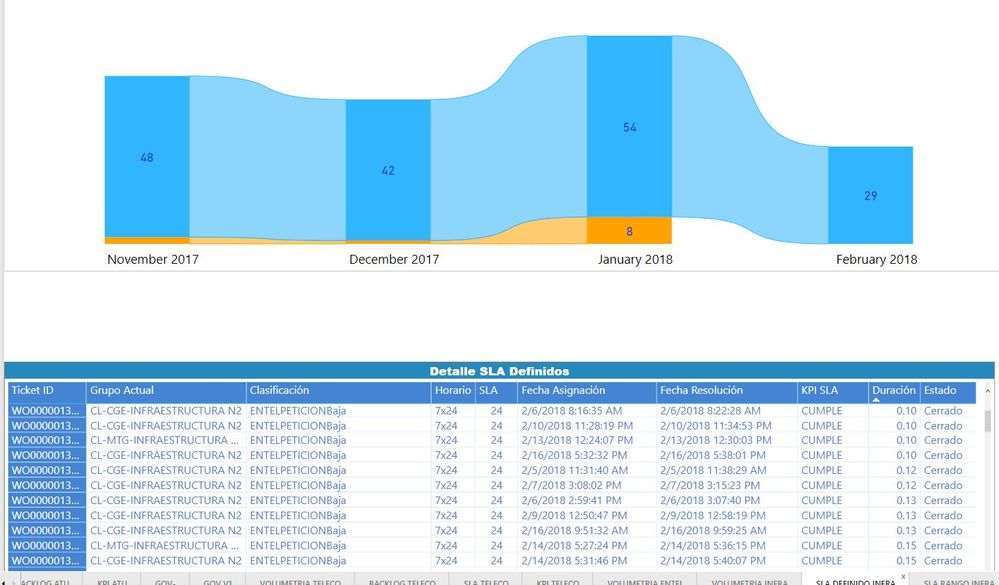
@Anonymous It might not be a 100% solution for you but I suggest the following: make a copy of your chart (Copy and paste) and click on that second chart and convert that second chart into a matrix and you will see permanetly what you want to see ... something like this:
Power BI doesn't support saving the column you saved when using "See Records". You can vote for this idea if needed.
https://ideas.powerbi.com/forums/265200-power-bi-ideas/suggestions/15090138-see-records-column-setup
The Power BI Data Visualization World Championships is back! Get ahead of the game and start preparing now!
| User | Count |
|---|---|
| 39 | |
| 38 | |
| 38 | |
| 28 | |
| 27 |
| User | Count |
|---|---|
| 124 | |
| 88 | |
| 73 | |
| 66 | |
| 65 |