Join us at FabCon Atlanta from March 16 - 20, 2026, for the ultimate Fabric, Power BI, AI and SQL community-led event. Save $200 with code FABCOMM.
Register now!The Power BI Data Visualization World Championships is back! Get ahead of the game and start preparing now! Learn more
Hi PB Buddy,
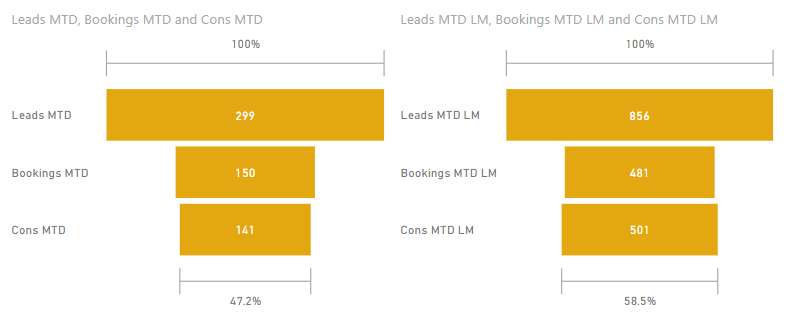
My question is about MTD, in the picture shown below, the funnel chart in left is this month September and right is the last Month August,
The figures for September (Left) is MTD (supposed today is 10th Sept, i.e. 9/1 to 9/10), this is the formula
Leads MTD = TOTALMTD( COUNT([Customer]), DATEADD( 'Date'[Date], 0, MONTH) )
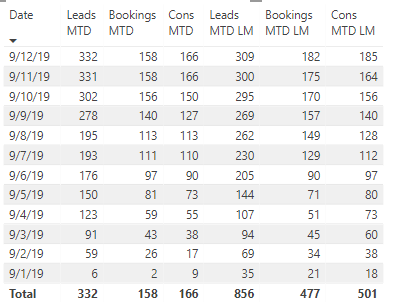
The figures for August (Right) is supposed to be 8/1 to 8/10, but now that it counts 8/1 to 8/30, the forumla is
Leads MTD LM = TOTALMTD( COUNT([Customer]), DATEADD( 'Date'[Date], -1, MONTH) )
How can I show the count for 8/1 to 8/10?
Many thanks!
@Anonymous
For any time intelligence function, you could implement a custom DAX formula.
https://www.sqlbi.com/articles/time-intelligence-in-power-bi-desktop/
I've searched many previous examples already, but still cannot get a right answer.
The main problem is that the total of last month is entire month, but I need a same period.
Leads MTD LM should be 309, not 856
Would anyone help? many thanks!
So sorry that this is not my desired answer
The Power BI Data Visualization World Championships is back! Get ahead of the game and start preparing now!
| User | Count |
|---|---|
| 39 | |
| 38 | |
| 38 | |
| 28 | |
| 27 |
| User | Count |
|---|---|
| 124 | |
| 88 | |
| 73 | |
| 66 | |
| 65 |