cancel
Showing results for 
Search instead for 
Did you mean: 

Join the FabCon + SQLCon recap series. Up next: Power BI, Real-Time Intelligence, IQ and AI, and Data Factory take center stage. All sessions are available on-demand after the live show. Register now

Reply
Anonymous
Not applicable

MS Project baseline tracking

Dear all,

need Your help on tracking baselines in Projects.

I apologize in advance for the format or mistakes as I'm a total newbie to this "measures" and "tables" world.

1) I want to get into the BPI view and show to BUs if there is any baseline on their Projects at all.

And I used the formula found on some PBI-Project template to add a column with logical test, based on Baseline Finish date (if there is no baseline set, than there is no value in this field or any other baselines field).


Baseline status = IF(ISBLANK(RELATED(ProjectBaselines[Project Baseline Finish Date]))=TRUE();"No";"Yes")


And I "almost" get what I want:

Baseline view.PNG


However, I've noticed, that it only gets values for "Baseline 0" and PMs not always set the Baseline 0 as first/initial.  So in query editor I found, that there is a filter step, that filters all the rest of the baseline numbers, like 1,2, etc.


#"Filtered Rows" = Table.SelectRows(ProjectBaselines_table, each ([BaselineNumber] = 0))


If I remove the filter, I get an error:  Column 'Project Id' in Table 'ProjectBaselines' contains a duplicate value '9805f398-2889-ea11-b0a8-00155d54a003' and this is not allowed for columns on the one side of a many-to-one relationship or for columns that are used as the primary key of a table.

The one and only active relationship between the tables is this:
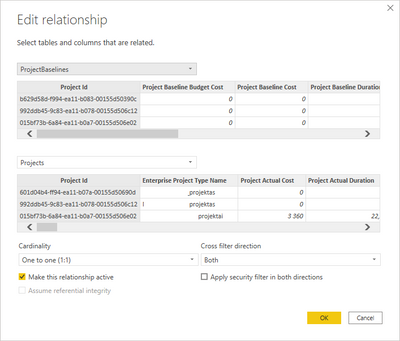
Relationship.png


If I select any other relationship with *:1 or *:*, then I don't get that relationship error, but I get an error on my logical test formula for "Baseline status":


"The column 'ProjectBaselines[Project Baseline Finish Date]' either doesn't exist or doesn't have a relationship to any table available in the current context. "

Can You point me, please, where and what has to be corrected, to get my "baseline checker" working on all possible baselines not only "0"?

2) When I have the 1) resolved, I would like to calculate Project KPIs based on the "latest"(sometimes, it can be not the highest number) Baseline and Actual numbers: Finish date, work, duration. I would assume, either I would need a date-time when was the latest baseline set. If it is possible at all to get that from Project Online Odata feed?  Or at least find/compare the baselines, that have "latest" finish date. I tried to "Google" this out, but did not found anything at the level of my understanding 🙄.

Thank You in advance for any clues to these!


1 ACCEPTED SOLUTION
Anonymous
Not applicable

HI @Anonymous,

It seems like you are working with two tables that not contain unique field values.
In my opinion, I'd like to suggest creating a calculated table with dax formulas to extract values from two tables and remove duplicate rows.

Bridge =
DISTINCT (
    UNION ( ALL ( ProjectBaselines[Project Id] ), ALL ( Projects[Project Id] ) )
)

After these steps, you can use this 'bridge' table to link two tables and use bridge table key and raw table fields with 'aggregate' function/methods(e.g. max, min...) to get specific values.

How to join many to many with a bridge table in POWER BI 

Regards,

Xiaoxin Sheng

View solution in original post

1 REPLY 1
Anonymous
Not applicable

HI @Anonymous,

It seems like you are working with two tables that not contain unique field values.
In my opinion, I'd like to suggest creating a calculated table with dax formulas to extract values from two tables and remove duplicate rows.

Bridge =
DISTINCT (
    UNION ( ALL ( ProjectBaselines[Project Id] ), ALL ( Projects[Project Id] ) )
)

After these steps, you can use this 'bridge' table to link two tables and use bridge table key and raw table fields with 'aggregate' function/methods(e.g. max, min...) to get specific values.

How to join many to many with a bridge table in POWER BI 

Regards,

Xiaoxin Sheng

Helpful resources

Announcements
April Power BI Update Carousel

Power BI Monthly Update - April 2026

Check out the April 2026 Power BI update to learn about new features.

New to Fabric survey Carousel

New to Fabric Survey

If you have recently started exploring Fabric, we'd love to hear how it's going. Your feedback can help with product improvements.

Power BI DataViz World Championships carousel

Power BI DataViz World Championships - June 2026

A new Power BI DataViz World Championship is coming this June! Don't miss out on submitting your entry.

FabCon and SQLCon Highlights Carousel

FabCon & SQLCon Highlights

Experience the highlights from FabCon & SQLCon, available live and on-demand starting April 14th.

Users online (2,747)