Don't miss your chance to take the Fabric Data Engineer (DP-600) exam for FREE! Find out how by watching the DP-600 session on-demand now through April 28th.
Learn moreJoin the FabCon + SQLCon recap series. Up next: Power BI, Real-Time Intelligence, IQ and AI, and Data Factory take center stage. All sessions are available on-demand after the live show. Register now
Total shipped qty =
SUMX('Amazon YTD','Amazon YTD'[Shipped Quantity]*RELATED('summary table'[MPU]))Hi All,
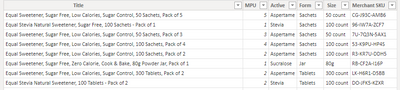
I have a table which have got the product name, which includes the Pack size as part of the text string :
I have inserted a column with the MID function which extract the pack size from the string.
But now I am trying to use the MID function in a variable, so that I can multiple the shipped qty with the pack size (Called "MPU" here) and get the total qty :
Solved! Go to Solution.
Hi @monojchakrab ,
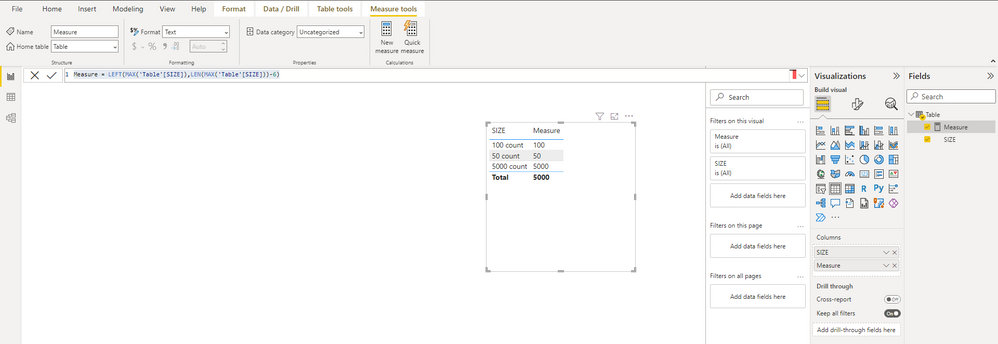
You want to extract the number from the strings in Size column, right?
It is recommended that you use the LEFT() function to get the number.
Measure = LEFT(MAX('Table'[SIZE]),LEN(MAX('Table'[SIZE]))-6)
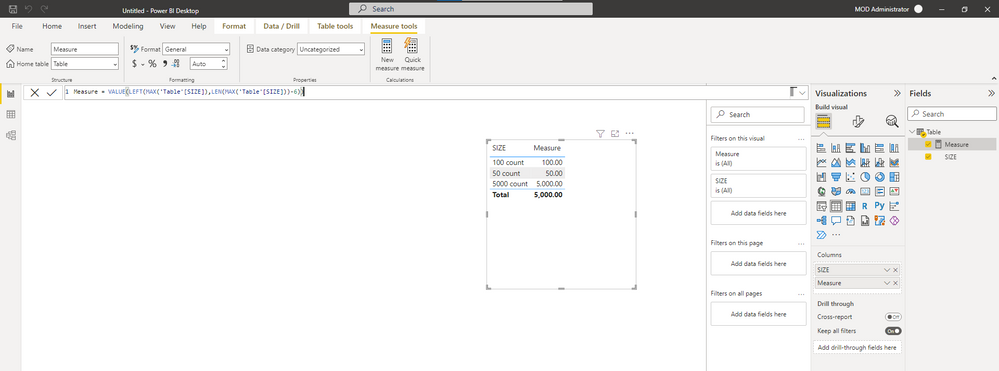
You will find that the numbers you propose are text types, you can modify the type manually, or you can add VALUE() to change the number type.
Best Regards,
Stephen Tao
If this post helps, then please consider Accept it as the solution to help the other members find it more quickly.
Hi @monojchakrab ,
You want to extract the number from the strings in Size column, right?
It is recommended that you use the LEFT() function to get the number.
Measure = LEFT(MAX('Table'[SIZE]),LEN(MAX('Table'[SIZE]))-6)
You will find that the numbers you propose are text types, you can modify the type manually, or you can add VALUE() to change the number type.
Best Regards,
Stephen Tao
If this post helps, then please consider Accept it as the solution to help the other members find it more quickly.
Total shipped qty =
VAR _Title= SELECTCOLUMNS('Amazon YTD',"Title",'Amazon YTD'[Title]) --chooses to colum of [Title] to apply the MID function to; this is from the same table so did not have to use the Related function
VAR _SearchPack = SEARCH("of",_Title,,0)+3 --In order to find the starting position for the MID function
VAR _MPU = value(MID(_Title,_SearchPack,1)) --extracts the pack size and converts to numeric value
return
SUMX('Amazon YTD','Amazon YTD'[Shipped Quantity]*_MPU) --iterates over [shipped qty] and multiplies by the pack size to arrive at the volume@amitchandak - Amit, I rewrote the code, and did not use the RELATED function as I am pulling the String column ([Title]) fromt the same table.
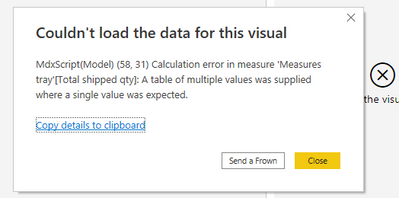
But this one is returning an error as follows :
Any reason why and how to get out of it?
Thanks
@monojchakrab , First bring this as a column -RELATED('summary table'[MPU])
and then try MID
Check out the April 2026 Power BI update to learn about new features.
If you have recently started exploring Fabric, we'd love to hear how it's going. Your feedback can help with product improvements.
A new Power BI DataViz World Championship is coming this June! Don't miss out on submitting your entry.
| User | Count |
|---|---|
| 41 | |
| 37 | |
| 34 | |
| 21 | |
| 16 |
| User | Count |
|---|---|
| 65 | |
| 59 | |
| 31 | |
| 25 | |
| 25 |