Join us at FabCon Atlanta from March 16 - 20, 2026, for the ultimate Fabric, Power BI, AI and SQL community-led event. Save $200 with code FABCOMM.
Register now!The Power BI Data Visualization World Championships is back! Get ahead of the game and start preparing now! Learn more
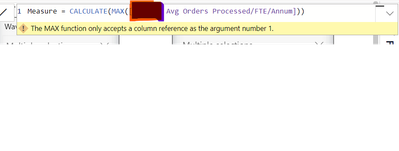
I have a measure which i have created and result of the measure is something like this. I need to find out Max value out of this output.
| Accuracy | |
| Customer 1 | 99.97% |
| Customer 2 | 99.82% |
| Customer 3 | 99.82% |
| Customer 4 | 99.96% |
| Customer 5 | 99.97% |
| Customer 6 | 99.66% |
However i get below error message
Solved! Go to Solution.
You need to look at the MAXX function. It works like this.
If you have a measure that calculates sales
Sales = SUM ( Sales_Table[Sales Amount] )
And you want the MAX Sales amount across all customers it would be
Max Sales = MAXX ( Values ( Customer[Customer Number] ), [Sales] )
You need to look at the MAXX function. It works like this.
If you have a measure that calculates sales
Sales = SUM ( Sales_Table[Sales Amount] )
And you want the MAX Sales amount across all customers it would be
Max Sales = MAXX ( Values ( Customer[Customer Number] ), [Sales] )
The Power BI Data Visualization World Championships is back! Get ahead of the game and start preparing now!
| User | Count |
|---|---|
| 39 | |
| 37 | |
| 33 | |
| 32 | |
| 29 |
| User | Count |
|---|---|
| 133 | |
| 88 | |
| 85 | |
| 68 | |
| 64 |