Join us at FabCon Atlanta from March 16 - 20, 2026, for the ultimate Fabric, Power BI, AI and SQL community-led event. Save $200 with code FABCOMM.
Register now!The Power BI Data Visualization World Championships is back! Get ahead of the game and start preparing now! Learn more
Hi,
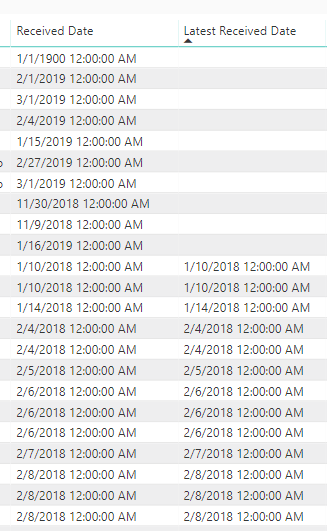
I have a basic measure to retrieve the MAX value for a date field, however, for some records it shows blank when the base date field has a value:
Latest Received Date = MAX(Table1[Received Date]).
I'm not sure what the issue is here. Has anyone seen something like this? The end goal is to calculate a date differential using this latest received date. The DAX requires a scalar value, so I'm using MAX to retrieve it.
Thanks!
Hi,
I had the same problem, i used some functions and it returned blank
if someone knows exactly the origin of the problem.
to overcome it here is what i did
Measure =
VAR dtf = CALCULATETABLE(FILTERS(Table1[Received Date]))
VAR dt =IF(COUNTROWS(dtf)=1,dtf)
RETURN dt
@Anonymous ,
Try adding a calculated column instead of measure.
Hi,
I forgot to mention that it is a Direct Query model so I can't use MAX in a calculated column. I also need to reference this single scalar value in a different DAX calculation. I've also tried SELECTEDVALUE and the result is the same; returns the same value as the base Received Date column for almost every record except the dates pictured above.
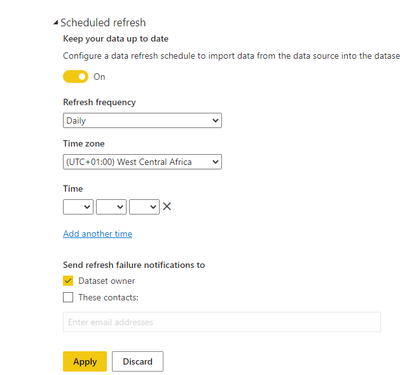
If I switch to import (Azure SQL), is daily the most frequent refresh that can be scheduled?
@Anonymous Hi Sicilian -- is your requirement to find to MAX date for the entire received column, or the MAX date per row?
If you switch to import mode you can refresh up to 8 times per day using Pro BI Pro version.
We are using Power BI Premium, but in the data set options for scheduled refresh, the drop down only allows Daily/Weekly. Does this 8x per day limit mean it must be done manually intra-day?
You can schedule multiple times just as @Anonymous has said. Check reference picture below.
The Power BI Data Visualization World Championships is back! Get ahead of the game and start preparing now!
Check out the November 2025 Power BI update to learn about new features.
| User | Count |
|---|---|
| 59 | |
| 46 | |
| 42 | |
| 23 | |
| 18 |
| User | Count |
|---|---|
| 192 | |
| 125 | |
| 99 | |
| 67 | |
| 48 |