cancel
Showing results for 
Search instead for 
Did you mean: 

The Power BI Data Visualization World Championships is back! Get ahead of the game and start preparing now! Learn more

Reply
Anonymous
Not applicable

M engine error

Hi, 


I am connecting to an on-prem sql server from power bi desktop. I can load the data into the query editor properly but once i try to apply changes and close i keep getting this message : "Failed to save modifications to the server. Error returned: 'M Engine error: 'System; The directory name C:\Users\[user name]\AppData\Local\Microsoft\Power BI Desktop\CertifiedExtensions is invalid.'. 


I checked the query and there are no errors there.

I tried closing the power bi desktop multiple times and retried but in vain. Any guidance would be appreciated. Thanks!

1 ACCEPTED SOLUTION
Pragati11
Super User
Super User

Hi @Anonymous ,


Try disabling this option in Power BI Desktop:

Pragati11_0-1599160379111.png

Save Power Bi file and try again your SQL Server connection.


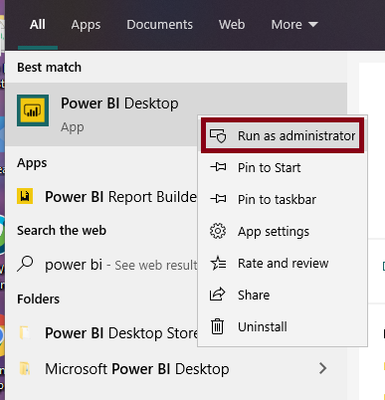
If the above doesn't work, open Power BI Desktop as an admin and then try your database connection.

Pragati11_1-1599160520958.png


Thanks,

Pragati

Best Regards,

Pragati Jain


MVP logo


LinkedIn | Twitter | Blog YouTube 

Did I answer your question? Mark my post as a solution! This will help others on the forum!

Appreciate your Kudos!!

Proud to be a Super User!!

View solution in original post

2 REPLIES 2
Pragati11
Super User
Super User

Hi @Anonymous ,


Try disabling this option in Power BI Desktop:

Pragati11_0-1599160379111.png

Save Power Bi file and try again your SQL Server connection.


If the above doesn't work, open Power BI Desktop as an admin and then try your database connection.

Pragati11_1-1599160520958.png


Thanks,

Pragati

Best Regards,

Pragati Jain


MVP logo


LinkedIn | Twitter | Blog YouTube 

Did I answer your question? Mark my post as a solution! This will help others on the forum!

Appreciate your Kudos!!

Proud to be a Super User!!

I really appreciate Pragati11's help, but I didn't see "Store datasets using enhanced metadata format" as an option to disable in "Preview Features".


Per her suggestion, I had to run Power BI as and admin for my Direct Query SQL connection. Why should I have to run Power BI with admin rights just to access an SQL Server DB via Direct Query?


ALSO: Microsoft, please create a GNU\Linux version of Power BI. I don't like the naming convention of GNU\Linux background drivers, but I find myself primarly using GNU\Linux at work. There should be a Microsoft sanctioned flavor of GNU\Linux that does not name background drivers daemons. People should not feel like "criminals" for using the Wine emulation layer which sometimes works better with older programs than native Windows 10...

Helpful resources

Announcements
Power BI DataViz World Championships

Power BI Dataviz World Championships

The Power BI Data Visualization World Championships is back! Get ahead of the game and start preparing now!

December 2025 Power BI Update Carousel

Power BI Monthly Update - December 2025

Check out the December 2025 Power BI Holiday Recap!

FabCon Atlanta 2026 carousel

FabCon Atlanta 2026

Join us at FabCon Atlanta, March 16-20, for the ultimate Fabric, Power BI, AI and SQL community-led event. Save $200 with code FABCOMM.