Join us at FabCon Atlanta from March 16 - 20, 2026, for the ultimate Fabric, Power BI, AI and SQL community-led event. Save $200 with code FABCOMM.
Register now!Get Fabric certified for FREE! Don't miss your chance! Learn more
Hi all,
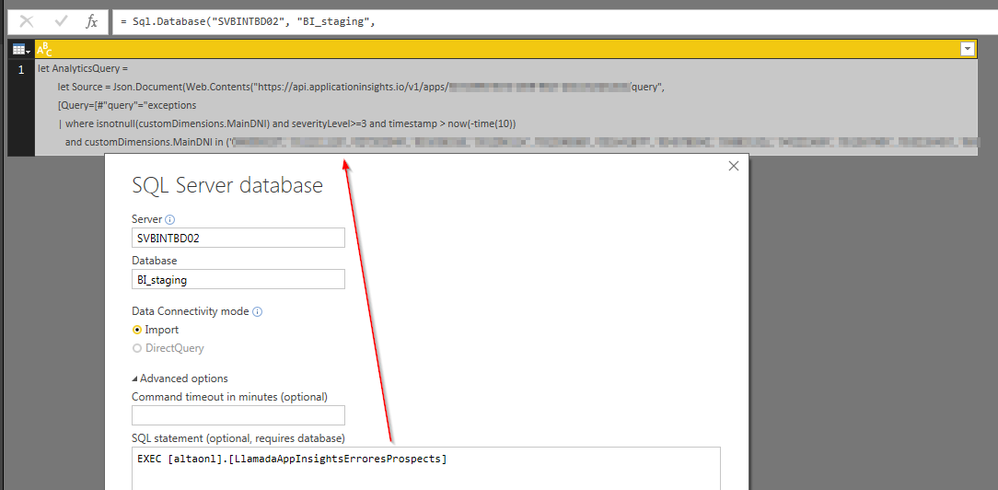
I'd like to build a query in the advanced editor and I need to do it dynamically reading data from a SQL Server database. I've created a stored procedure that returns the complete M query that I need to execute:
let
Source = Sql.Database("SVBINTBD02", "BI_staging",
[Query="EXEC [altaonl].[LlamadaAppInsightsErroresProspects]"])
in
Source
This sentence returns the text of the query that I want to be executed in M language.
How can I do it?
Thanks in advance,
Héctor
Hi @hctr83,
You already can do it. What's your expected result? Or what's the problem?
Best Regards,
Dale
Hi Dale!
Thanks a lot for your comment.
The string returned by the stored procedure is the query that I want to be executed (it's a query wrote in M language to get data from Application Insights -> in Azure).
How should I write it in the advanced editor?
Best Regards!
Hi @hctr83,
As far as I know, this isn't available for now. What's your purpose? Maybe we can find another approach.
Best Regards,
Dale
Share feedback directly with Fabric product managers, participate in targeted research studies and influence the Fabric roadmap.
Check out the February 2026 Power BI update to learn about new features.
| User | Count |
|---|---|
| 68 | |
| 60 | |
| 47 | |
| 20 | |
| 16 |
| User | Count |
|---|---|
| 109 | |
| 107 | |
| 39 | |
| 27 | |
| 27 |