Get Fabric or SQL Certified for Free.
Get certified for free when you join Fabric Data Days 2026 and dive into Fabric, Power BI, SQL, AI, and other essential data skills.
Join now- Power BI forums
- Get Help with Power BI
- Desktop
- Service
- Report Server
- Power Query
- Mobile Apps
- Developer
- DAX Commands and Tips
- Custom Visuals Development Discussion
- Health and Life Sciences
- Power BI Spanish forums
- Translated Spanish Desktop
- Training and Consulting
- Instructor Led Training
- Dashboard in a Day for Women, by Women
- Galleries
- Data Stories Gallery
- Themes Gallery
- Contests Gallery
- QuickViz Gallery
- Quick Measures Gallery
- Visual Calculations Gallery
- Notebook Gallery
- Translytical Task Flow Gallery
- TMDL Gallery
- R Script Showcase
- Webinars and Video Gallery
- Ideas
- Custom Visuals Ideas (read-only)
- Issues
- Issues
- Events
- Upcoming Events
July 7 - July 17 | Round 2 of the Power BI Dataviz World Championships. Don't miss your chance! Learn more
- Power BI forums
- Forums
- Get Help with Power BI
- Desktop
- M-Query for given DAX query
- Subscribe to RSS Feed
- Mark Topic as New
- Mark Topic as Read
- Float this Topic for Current User
- Bookmark
- Subscribe
- Printer Friendly Page

- Mark as New
- Bookmark
- Subscribe
- Mute
- Subscribe to RSS Feed
- Permalink
- Report Inappropriate Content
M-Query for given DAX query
Hi, I want to convert the given DAX query into M-Query. Please help me ! Thanks
CALCULATE(
        SUM('Table'[Values]);
        FILTER(ALLSELECTED('Table'); 'Table'[Date] <= SELECTEDVALUE('Table'[Date]))
    )
Solved! Go to Solution.


- Mark as New
- Bookmark
- Subscribe
- Mute
- Subscribe to RSS Feed
- Permalink
- Report Inappropriate Content
Hi @Anonymous ,
You use SELECTEDVALUE in the DAX formula, so the output of this formula will be dynamic. If the formula is converted to M-Query, the result will be static. Do you want to use the parameters in the query editing? Could you share your expected output?
If you want to create “Running Totals in Power Query”, here are two ways:
1. Reference this article: Create Running Totals in Power Query
(tbl as table, sumcolumn as text, rowindex as number) =>
let
    #"Removed Other Columns" = Table.SelectColumns(tbl,{sumcolumn, "Index"}),
    #"Filtered Rows" = Table.SelectRows(#"Removed Other Columns", each [Index] <= rowindex),
    #"Renamed Columns" = Table.RenameColumns(#"Filtered Rows",{{sumcolumn, "Temp"}}),
    #"Grouped Rows" = Table.Group(#"Renamed Columns", {}, {{"RunningTotal", each List.Sum([Temp]), type number}}),
    RunningTotal = Record.Field(#"Grouped Rows"{0},"RunningTotal")
in
    RunningTotal
let
Source = Table,
#"Added Custom" = Table.AddColumn(Source, "Running Total", each fnRunningTotal(Source,"Value",[Index])),
#"Removed Columns" = Table.RemoveColumns(#"Added Custom",{"Index"})
in
#"Removed Columns"2. Reference this post: How to do a running Sum by group in Power Query?
(MyTable as table) as table =>
let
    Source = Table.Buffer(MyTable),
    TableType = Value.Type(Table.AddColumn(Source, "Running Sum", each null, type number)),
    Cumulative = List.Accumulate(Source[Value],{},(cumulative,cost) => cumulative & {List.Last(cumulative, 0) + cost}),
    AddedRunningSum = Table.FromColumns(Table.ToColumns(Source)&{Cumulative},TableType)
in
    AddedRunningSum
Here is a demo, please try it:
Best Regards,
Community Support Team _ Joey
If this post helps, then please consider Accept it as the solution to help the other members find it more quickly.


- Mark as New
- Bookmark
- Subscribe
- Mute
- Subscribe to RSS Feed
- Permalink
- Report Inappropriate Content
Hi @Anonymous
Please see the attached file with the solution, the file includes two Measures as below.
Cumulative Sum of Log =
VAR _maxIndex = MAX( 'Table'[Index] )
RETURN
CALCULATE(
    SUM( 'Table'[LogVal] ),
    ALLSELECTED( 'Table' ),
    VALUES( 'Table'[Groups] ),
    'Table'[Index] <= _maxIndex
)
and
Exp(N)-1 =
VAR _maxIndex = MAX( 'Table'[Index] )
RETURN
CALCULATE(
( EXP( SUM( 'Table'[LogVal] ) ) -1 ),
ALLSELECTED( 'Table' ),
VALUES( 'Table'[Groups] ),
'Table'[Index] <= _maxIndex
)Mariusz
If this post helps, then please consider Accepting it as the solution.
Please feel free to connect with me.
- Mark as New
- Bookmark
- Subscribe
- Mute
- Subscribe to RSS Feed
- Permalink
- Report Inappropriate Content
Hi @Anonymous ,
You use SELECTEDVALUE in the DAX formula, so the output of this formula will be dynamic. If the formula is converted to M-Query, the result will be static. Do you want to use the parameters in the query editing? Could you share your expected output?
If you want to create “Running Totals in Power Query”, here are two ways:
1. Reference this article: Create Running Totals in Power Query
(tbl as table, sumcolumn as text, rowindex as number) =>
let
    #"Removed Other Columns" = Table.SelectColumns(tbl,{sumcolumn, "Index"}),
    #"Filtered Rows" = Table.SelectRows(#"Removed Other Columns", each [Index] <= rowindex),
    #"Renamed Columns" = Table.RenameColumns(#"Filtered Rows",{{sumcolumn, "Temp"}}),
    #"Grouped Rows" = Table.Group(#"Renamed Columns", {}, {{"RunningTotal", each List.Sum([Temp]), type number}}),
    RunningTotal = Record.Field(#"Grouped Rows"{0},"RunningTotal")
in
    RunningTotal
let
Source = Table,
#"Added Custom" = Table.AddColumn(Source, "Running Total", each fnRunningTotal(Source,"Value",[Index])),
#"Removed Columns" = Table.RemoveColumns(#"Added Custom",{"Index"})
in
#"Removed Columns"2. Reference this post: How to do a running Sum by group in Power Query?
(MyTable as table) as table =>
let
    Source = Table.Buffer(MyTable),
    TableType = Value.Type(Table.AddColumn(Source, "Running Sum", each null, type number)),
    Cumulative = List.Accumulate(Source[Value],{},(cumulative,cost) => cumulative & {List.Last(cumulative, 0) + cost}),
    AddedRunningSum = Table.FromColumns(Table.ToColumns(Source)&{Cumulative},TableType)
in
    AddedRunningSum
Here is a demo, please try it:
Best Regards,
Community Support Team _ Joey
If this post helps, then please consider Accept it as the solution to help the other members find it more quickly.
- Mark as New
- Bookmark
- Subscribe
- Mute
- Subscribe to RSS Feed
- Permalink
- Report Inappropriate Content
Hi, Thanks for your reply and detailed explanation.
As you have mentioned i need dynamic solution with dates and other filters as well.
So i guess i need to do it in the DAX only but in DAX the formula is not giving output correctly.
Following is the DAX query
LogVal = LOG(1+Sheet1[Value])
%CumVal =
CALCULATE(
(exp(sum(Sheet1[LogVal]))-1)*100,
FILTER(ALLSELECTED(Sheet1), Sheet1[Index]<=Max(Sheet1[Index])
)
)
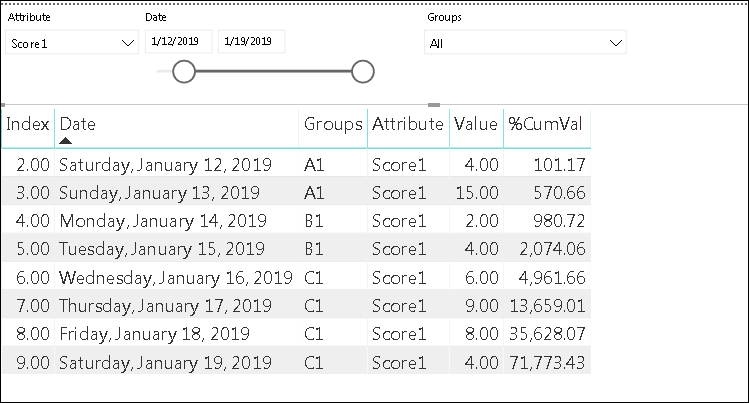
Following are some tables for original data and desired output and wrong output by DAX, Could you please throw some light on this how I can get correct output? Thanks
| Power Bi Table | ||||
| Index | Date | Groups | Attribute | Value |
| 1 | 1/11/2019 0:00 | A1 | Score1 | 1 |
| 1 | 1/11/2019 0:00 | A1 | Score2 | 4 |
| 2 | 1/12/2019 0:00 | A1 | Score1 | 4 |
| 2 | 1/12/2019 0:00 | A1 | Score2 | 8 |
| 3 | 1/13/2019 0:00 | A1 | Score1 | 15 |
| 3 | 1/13/2019 0:00 | A1 | Score2 | 5 |
| 4 | 1/14/2019 0:00 | B1 | Score1 | 2 |
| 4 | 1/14/2019 0:00 | B1 | Score2 | 9 |
| 5 | 1/15/2019 0:00 | B1 | Score1 | 4 |
| 5 | 1/15/2019 0:00 | B1 | Score2 | 6 |
| 6 | 1/16/2019 0:00 | C1 | Score1 | 6 |
| 6 | 1/16/2019 0:00 | C1 | Score2 | 4 |
| 7 | 1/17/2019 0:00 | C1 | Score1 | 9 |
| 7 | 1/17/2019 0:00 | C1 | Score2 | 7 |
| 8 | 1/18/2019 0:00 | C1 | Score1 | 8 |
| 8 | 1/18/2019 0:00 | C1 | Score2 | 5 |
| 9 | 1/19/2019 0:00 | C1 | Score1 | 4 |
| 9 | 1/19/2019 0:00 | C1 | Score2 | 6 |
Desired Output is as follows,
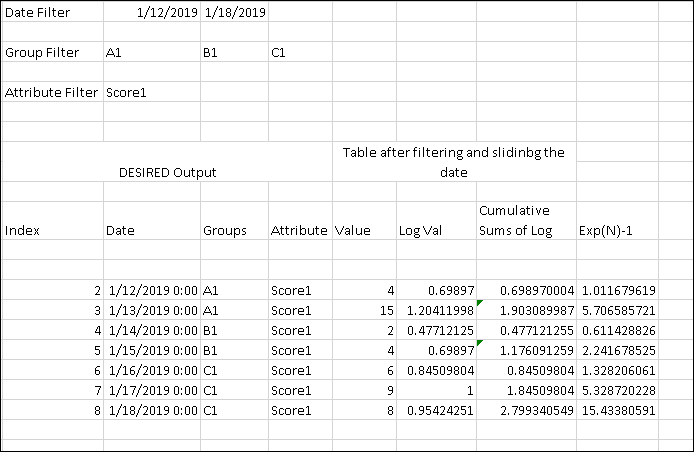
PowerBI is giving following wrong output
- Mark as New
- Bookmark
- Subscribe
- Mute
- Subscribe to RSS Feed
- Permalink
- Report Inappropriate Content
Hi @Anonymous
Please see the attached file with the solution, the file includes two Measures as below.
Cumulative Sum of Log =
VAR _maxIndex = MAX( 'Table'[Index] )
RETURN
CALCULATE(
    SUM( 'Table'[LogVal] ),
    ALLSELECTED( 'Table' ),
    VALUES( 'Table'[Groups] ),
    'Table'[Index] <= _maxIndex
)
and
Exp(N)-1 =
VAR _maxIndex = MAX( 'Table'[Index] )
RETURN
CALCULATE(
( EXP( SUM( 'Table'[LogVal] ) ) -1 ),
ALLSELECTED( 'Table' ),
VALUES( 'Table'[Groups] ),
'Table'[Index] <= _maxIndex
)Mariusz
If this post helps, then please consider Accepting it as the solution.
Please feel free to connect with me.
- Mark as New
- Bookmark
- Subscribe
- Mute
- Subscribe to RSS Feed
- Permalink
- Report Inappropriate Content
THanks for your solution. I have combined both of them in single query and it works.
Helpful resources

FabCon & SQLCon – Barcelona 2026
Join us in Barcelona for FabCon and SQLCon, the Fabric, Power BI, SQL, and AI community event. Save €200 with code FABCMTY200.

Data Days 2026
Join Fabric Data Days 2026: 60 days of free live/on-demand sessions, challenges, study groups, and certification opportunities.

Power BI DataViz World Championships - June 2026
A new Power BI DataViz World Championship is coming this June! Don't miss out on submitting your entry.

| User | Count |
|---|---|
| 22 | |
| 22 | |
| 18 | |
| 16 | |
| 13 |


| User | Count |
|---|---|
| 63 | |
| 42 | |
| 40 | |
| 40 | |
| 38 |


