cancel
Showing results for 
Search instead for 
Did you mean: 

The Power BI Data Visualization World Championships is back! Get ahead of the game and start preparing now! Learn more

Reply
Anonymous
Not applicable

M Query Divide

dd


Hello  -  I have a column coming in from our ERP system that does not properly place the decimal point.  


So instead of .5496 the column comes in as a text field and says 54.96.     Upon converting to a percent, it then changes to 5496% which of course is not correct.  


I think the only way to solve is to create a custom column that divides the original column by 100.   


I tried this but it does not work.   Any ideas?   


= Table.AddColumn(#"Changed Type4", "Custom", each Value.Divide([Discount],100,0
))

1 ACCEPTED SOLUTION

@Anonymous ,

Guess you got a little confused.


The M-Query should be as follows

= Table.AddColumn(#"Uppercased Text3", "Margin%", each [Margin]/ 100))

where #"Uppercased Text3" is the previous step

Margin% is the new column name

[Margin] is the column that you are going to divide

View solution in original post

6 REPLIES 6
Thejeswar
Super User
Super User

Hi @Anonymous ,

Pls. modify the m query as below and use it for getting the new column


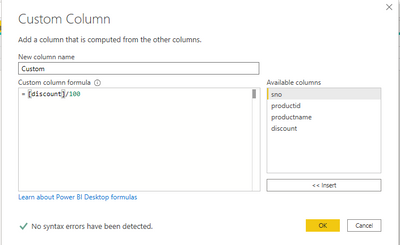
#"Add Column" = Table.AddColumn(#"Changed Type4", "Custom", each [Discount]/ 100)


A Custom column screenshot is as below

Thejeswar_0-1618800827237.png


Anonymous
Not applicable

Sorry, still not quite sure how to code this.  


The correct column actually is called Margin  (the original column).   I was going to create a new one called Margin%.     I am getting an error:  "the name Add Column" wasn't recognized.  


I tried this: 


= Table.AddColumn(#"Uppercased Text3", "Margin%", each #"Add Column" = Table.AddColumn(#"Changed Type4", "Margin%", each [Margin]/ 100))

@Anonymous ,

Guess you got a little confused.


The M-Query should be as follows

= Table.AddColumn(#"Uppercased Text3", "Margin%", each [Margin]/ 100))

where #"Uppercased Text3" is the previous step

Margin% is the new column name

[Margin] is the column that you are going to divide

Ashish_Mathur
Super User
Super User

Hi,

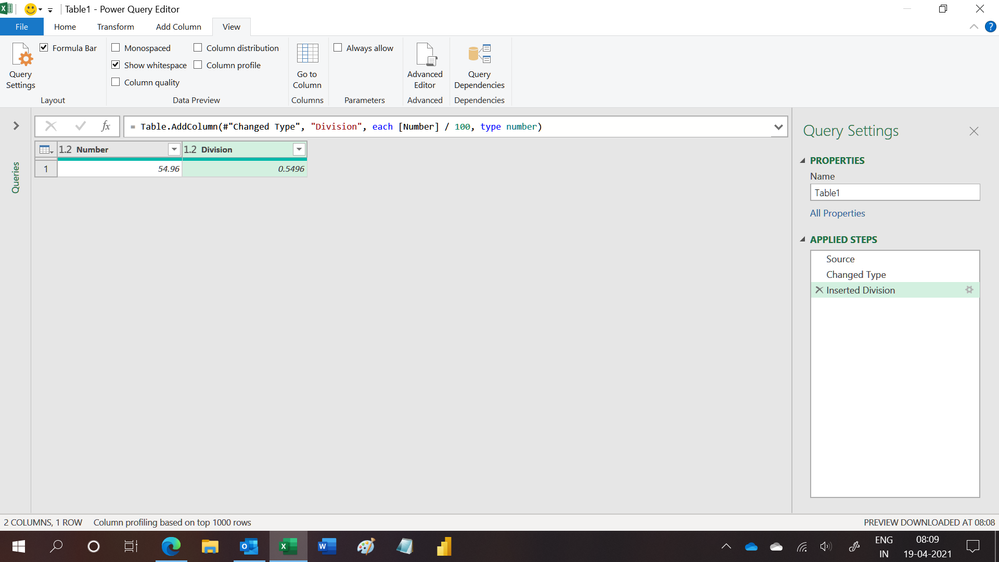
This M code works

let
    Source = Excel.CurrentWorkbook(){[Name="Table1"]}[Content],
    #"Changed Type" = Table.TransformColumnTypes(Source,{{"Number", type number}}),
    #"Inserted Division" = Table.AddColumn(#"Changed Type", "Division", each [Number] / 100, type number)
in
    #"Inserted Division"

Hope this helps.

Untitled.png


Regards,
Ashish Mathur
http://www.ashishmathur.com
https://www.linkedin.com/in/excelenthusiasts/
Anonymous
Not applicable

@Ashish_Mathur   That was fast!    I have no doubt this works, but I am total novice with m query.   I was just thinking a simple custom column would suffice for this.   How would I incorporate this into a custom column?

Hi,

Try this calculated column formula

=divide(Data[Amount],100)


Regards,
Ashish Mathur
http://www.ashishmathur.com
https://www.linkedin.com/in/excelenthusiasts/

Helpful resources

Announcements
Power BI DataViz World Championships

Power BI Dataviz World Championships

The Power BI Data Visualization World Championships is back! Get ahead of the game and start preparing now!

December 2025 Power BI Update Carousel

Power BI Monthly Update - December 2025

Check out the December 2025 Power BI Holiday Recap!

FabCon Atlanta 2026 carousel

FabCon Atlanta 2026

Join us at FabCon Atlanta, March 16-20, for the ultimate Fabric, Power BI, AI and SQL community-led event. Save $200 with code FABCOMM.