Join us at FabCon Atlanta from March 16 - 20, 2026, for the ultimate Fabric, Power BI, AI and SQL community-led event. Save $200 with code FABCOMM.
Register now!The Power BI Data Visualization World Championships is back! Get ahead of the game and start preparing now! Learn more
Dear Masters of M Language,
Need help to work with data formats in M Language.
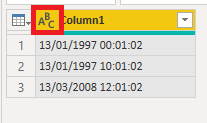
I have a column with the format dd/mm/yyyy hh:mm:ss I need to replicate this column containing only dd/mm/yyyy.
I'm sure it's very simple, please help.
Solved! Go to Solution.
Hi @Anonymous ,
PowerBI does not directly identify a date from a format dd/mm/yyyy hh:mm:ss but if you first convert your text to date/time it will work.
How to do this :
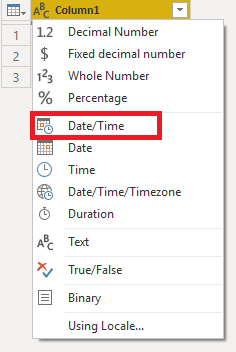
1. On top of your culumn you can chose data type for your column. Click there and choose Date/Time.
Repeath this step but chose "Date" this time.
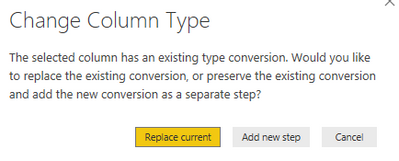
Dont replace current change but add a new step (screenshot below)
Tell me if this worked as desired !
Regards,
Etienne
Hi @Anonymous ,
PowerBI does not directly identify a date from a format dd/mm/yyyy hh:mm:ss but if you first convert your text to date/time it will work.
How to do this :
1. On top of your culumn you can chose data type for your column. Click there and choose Date/Time.
Repeath this step but chose "Date" this time.
Dont replace current change but add a new step (screenshot below)
Tell me if this worked as desired !
Regards,
Etienne
Thanks! It worked just fine.
The Power BI Data Visualization World Championships is back! Get ahead of the game and start preparing now!
| User | Count |
|---|---|
| 63 | |
| 55 | |
| 42 | |
| 41 | |
| 23 |
| User | Count |
|---|---|
| 167 | |
| 136 | |
| 120 | |
| 79 | |
| 54 |