Join us at FabCon Atlanta from March 16 - 20, 2026, for the ultimate Fabric, Power BI, AI and SQL community-led event. Save $200 with code FABCOMM.
Register now!The Power BI Data Visualization World Championships is back! It's time to submit your entry. Live now!
Dear Masters of M Language,
Need help to work with data formats in M Language.
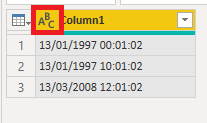
I have a column with the format dd/mm/yyyy hh:mm:ss I need to replicate this column containing only dd/mm/yyyy.
I'm sure it's very simple, please help.
Solved! Go to Solution.
Hi @Anonymous ,
PowerBI does not directly identify a date from a format dd/mm/yyyy hh:mm:ss but if you first convert your text to date/time it will work.
How to do this :
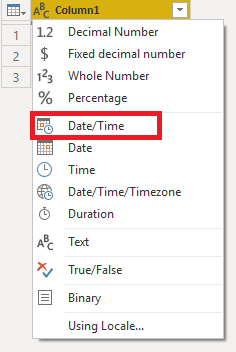
1. On top of your culumn you can chose data type for your column. Click there and choose Date/Time.
Repeath this step but chose "Date" this time.
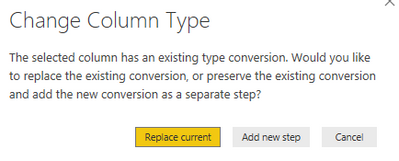
Dont replace current change but add a new step (screenshot below)
Tell me if this worked as desired !
Regards,
Etienne
Hi @Anonymous ,
PowerBI does not directly identify a date from a format dd/mm/yyyy hh:mm:ss but if you first convert your text to date/time it will work.
How to do this :
1. On top of your culumn you can chose data type for your column. Click there and choose Date/Time.
Repeath this step but chose "Date" this time.
Dont replace current change but add a new step (screenshot below)
Tell me if this worked as desired !
Regards,
Etienne
Thanks! It worked just fine.
The Power BI Data Visualization World Championships is back! It's time to submit your entry.
Check out the January 2026 Power BI update to learn about new features.
| User | Count |
|---|---|
| 71 | |
| 45 | |
| 34 | |
| 28 | |
| 23 |
| User | Count |
|---|---|
| 143 | |
| 121 | |
| 59 | |
| 40 | |
| 33 |