cancel
Showing results for 
Search instead for 
Did you mean: 

The Power BI Data Visualization World Championships is back! Get ahead of the game and start preparing now! Learn more

Reply
tonijj
Helper IV
Helper IV

M Code generating Week numbers

Hi,


Im building a report to show Resource Planning at our company. As such Im trying to use M Code to populate a list of data based on the datatable. 


What I want to achieve;


M Code to generate 1 row per week number - based on the set in the datatable. 

Example: In the picture below, as I have a Start Date (Week number) and End Date (Week Number), I want the M code to generate 1 row of data per week, within that range. 
bi example dates.png


So, if the Start Date is Week 5, and End Week is 10 - it should therefore generate 5 rows. 

1 row for week 5

1 row for week 6

and so on....


I have done similar in the past (with help from this excellent community!) to generate if you set a start and end date using a DateKey, such as "2020-01-01" to "2020-12-31". So for days it works great, but using it with Week numbers instead was a whole different story for me 😞 

That code was something like this (for reference): 
#"Added Custom" = Table.AddColumn(#"Renamed Columns", "Date", each List.Dates([Start],Duration.Days([End]-[Start])+1,#duration(1,0,0,0))),
#"Expanded Date" = Table.ExpandListColumn(#"Added Custom", "Date"),
#"Removed Columns1" = Table.RemoveColumns(#"Expanded Date",{"Start", "End"}),

End Result;
I want to be able to visually show the resource planning and utilization, based on weeks, like something like the picture below. 

Bonus Question: 
How could I make sure it works for e.g 2 year, meaning, if the assignment spans from 2020 to 2021?
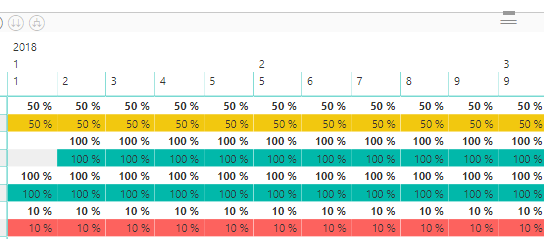
year month week.png


Example data shared here:

Reference material 


5 REPLIES 5
ImkeF
Community Champion
Community Champion

Hi @tonijj 

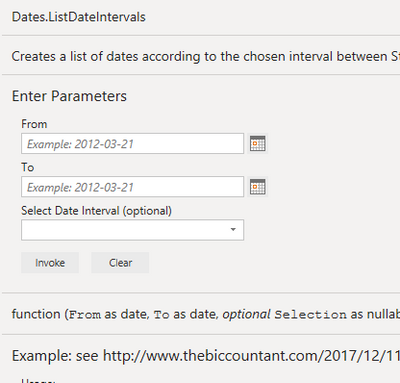
please check out this function: https://www.thebiccountant.com/2017/12/11/date-datesbetween-retrieve-dates-between-2-dates-power-bi-... 


Imke Feldmann (The BIccountant)

If you liked my solution, please give it a thumbs up. And if I did answer your question, please mark this post as a solution. Thanks!

How to integrate M-code into your solution -- How to get your questions answered quickly -- How to provide sample data -- Check out more PBI- learning resources here -- Performance Tipps for M-queries

Hi Imke,


Thank you for taking time!


I've read your full article (great one by the way!). Unfortunately I dont think it takes me all the way to the finish line. That could be on the other hand, due to my lack of knowledge of coding 😕 


The result I want to achieve is that the code generates X amount of automatic rows depending on the span. So for the example below, its a range of 5 weeks (10 to 15) and hence generating 5 rows as such. 
generate rows.png


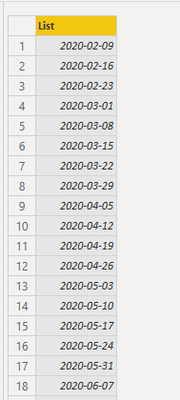
When adding your code this is what I get, and again, it might just be my lack of knowledge here!
gen week.pnglist of weeks.png


ImkeF
Community Champion
Community Champion

Hi @tonijj  

Thank you! I think you're nearly there. What you've achieved is a list of dates with weekly intervals. Just transform those with a function like Date.WeekOfYear for example and you'll get the week numbers.


Imke Feldmann (The BIccountant)

If you liked my solution, please give it a thumbs up. And if I did answer your question, please mark this post as a solution. Thanks!

How to integrate M-code into your solution -- How to get your questions answered quickly -- How to provide sample data -- Check out more PBI- learning resources here -- Performance Tipps for M-queries

@ImkeF 


Any chance you could take a quick look the Example file I made available via OneDrive with my example data? I tried adding date.weekofdays but with no luck...


Would really appreciate if you have 2min just to open my workbook, and maybe add your magic 🙂  


Greg_Deckler
Community Champion
Community Champion

@ImkeF


Follow on LinkedIn
@ me in replies or I'll lose your thread!!!
Instead of a Kudo, please vote for this idea
Become an expert!: Enterprise DNA
External Tools: MSHGQM
YouTube Channel!: Microsoft Hates Greg
Latest book!:
DAX For Humans

DAX is easy, CALCULATE makes DAX hard...

Helpful resources

Announcements
Power BI DataViz World Championships

Power BI Dataviz World Championships

The Power BI Data Visualization World Championships is back! Get ahead of the game and start preparing now!

December 2025 Power BI Update Carousel

Power BI Monthly Update - December 2025

Check out the December 2025 Power BI Holiday Recap!

FabCon Atlanta 2026 carousel

FabCon Atlanta 2026

Join us at FabCon Atlanta, March 16-20, for the ultimate Fabric, Power BI, AI and SQL community-led event. Save $200 with code FABCOMM.

Top Solution Authors