Join us at FabCon Atlanta from March 16 - 20, 2026, for the ultimate Fabric, Power BI, AI and SQL community-led event. Save $200 with code FABCOMM.
Register now!The Power BI Data Visualization World Championships is back! Get ahead of the game and start preparing now! Learn more
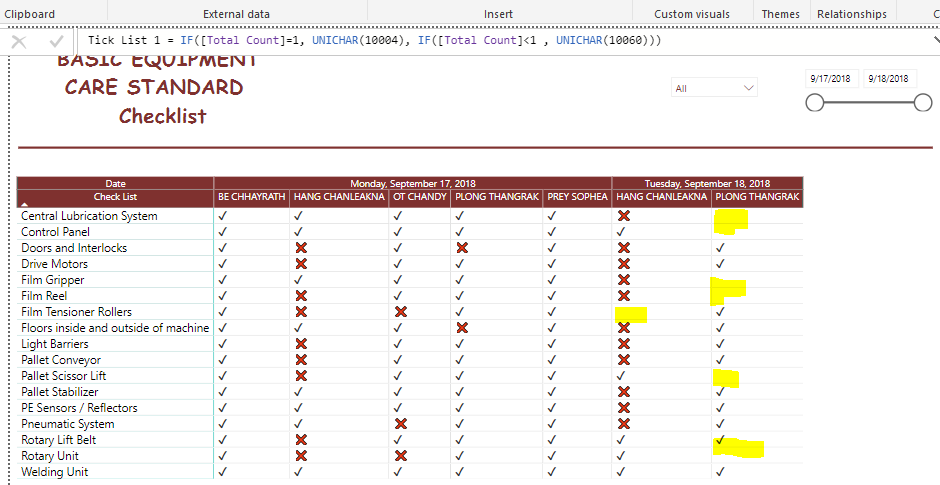
hi , i'm not sure why it doesn't show the X in red color in column while the other yes
can you help on this case ?
Thx
Solved! Go to Solution.
Hi @Chanleakna123,
Please create a new table to return distinct values form matrix row group Check List:
Table = DISTINCT([Check List])
Then create a relationship between this new table with original table, then drag the Check List from new table to the matrix Row bucket, modify the measure like below:
Tick List 1=IF([Total Count]+0=1,UNICHAR(10004),IF([Total Count]+0<1,UNICHAR(10060)))
Reference:
https://community.powerbi.com/t5/Desktop/Display-zero-instead-of-blank-in-matrix/td-p/193745
Best Regards,
Qiuyun Yu
How do you did that table and do that check list? I want to do something similar but I can't find examples, can you help me with this please
Hi @Chanleakna123,
Please create a new table to return distinct values form matrix row group Check List:
Table = DISTINCT([Check List])
Then create a relationship between this new table with original table, then drag the Check List from new table to the matrix Row bucket, modify the measure like below:
Tick List 1=IF([Total Count]+0=1,UNICHAR(10004),IF([Total Count]+0<1,UNICHAR(10060)))
Reference:
https://community.powerbi.com/t5/Desktop/Display-zero-instead-of-blank-in-matrix/td-p/193745
Best Regards,
Qiuyun Yu
@v-qiuyu-msft those Red X appeared when there's no value.
in my list equal to 1 when the users submit. if they failed to check the control panel list as description shown , it will not show in the file either.
Therefore the condition should be , if the user submit equl =1 , it will show "Tick Sign "
if the users didn't submit all the check list provided it will show " X Sign "
i think my condition weren't right. can you help me ?
Hi @Chanleakna123,
From your screenshot, only when the measure [Total Count] <1 then it will display red X. You need to firstly check if the [Total Count] values in this highlighted cells less than 1.
Best Regards,
Qiuyun Yu
The Power BI Data Visualization World Championships is back! Get ahead of the game and start preparing now!
| User | Count |
|---|---|
| 39 | |
| 38 | |
| 38 | |
| 28 | |
| 27 |
| User | Count |
|---|---|
| 124 | |
| 88 | |
| 73 | |
| 66 | |
| 65 |