Join us at FabCon Atlanta from March 16 - 20, 2026, for the ultimate Fabric, Power BI, AI and SQL community-led event. Save $200 with code FABCOMM.
Register now!The Power BI Data Visualization World Championships is back! Get ahead of the game and start preparing now! Learn more
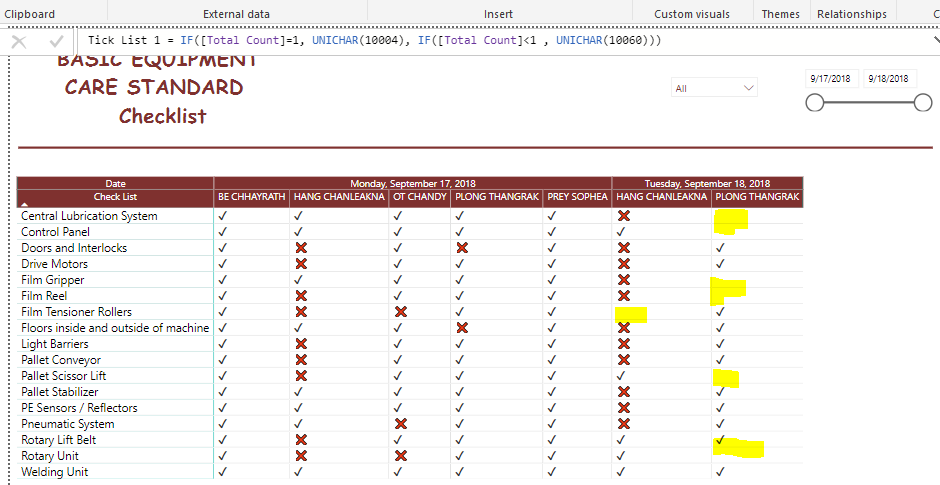
hi , i'm not sure why it doesn't show the X in red color in column while the other yes
can you help on this case ?
Thx
Solved! Go to Solution.
Hi @Chanleakna123,
Please create a new table to return distinct values form matrix row group Check List:
Table = DISTINCT([Check List])
Then create a relationship between this new table with original table, then drag the Check List from new table to the matrix Row bucket, modify the measure like below:
Tick List 1=IF([Total Count]+0=1,UNICHAR(10004),IF([Total Count]+0<1,UNICHAR(10060)))
Reference:
https://community.powerbi.com/t5/Desktop/Display-zero-instead-of-blank-in-matrix/td-p/193745
Best Regards,
Qiuyun Yu
How do you did that table and do that check list? I want to do something similar but I can't find examples, can you help me with this please
Hi @Chanleakna123,
Please create a new table to return distinct values form matrix row group Check List:
Table = DISTINCT([Check List])
Then create a relationship between this new table with original table, then drag the Check List from new table to the matrix Row bucket, modify the measure like below:
Tick List 1=IF([Total Count]+0=1,UNICHAR(10004),IF([Total Count]+0<1,UNICHAR(10060)))
Reference:
https://community.powerbi.com/t5/Desktop/Display-zero-instead-of-blank-in-matrix/td-p/193745
Best Regards,
Qiuyun Yu
@v-qiuyu-msft those Red X appeared when there's no value.
in my list equal to 1 when the users submit. if they failed to check the control panel list as description shown , it will not show in the file either.
Therefore the condition should be , if the user submit equl =1 , it will show "Tick Sign "
if the users didn't submit all the check list provided it will show " X Sign "
i think my condition weren't right. can you help me ?
Hi @Chanleakna123,
From your screenshot, only when the measure [Total Count] <1 then it will display red X. You need to firstly check if the [Total Count] values in this highlighted cells less than 1.
Best Regards,
Qiuyun Yu
The Power BI Data Visualization World Championships is back! Get ahead of the game and start preparing now!
Check out the November 2025 Power BI update to learn about new features.
| User | Count |
|---|---|
| 59 | |
| 43 | |
| 42 | |
| 23 | |
| 17 |
| User | Count |
|---|---|
| 190 | |
| 122 | |
| 96 | |
| 66 | |
| 47 |