cancel
Showing results for 
Search instead for 
Did you mean: 

The Power BI Data Visualization World Championships is back! Get ahead of the game and start preparing now! Learn more

Reply
Anonymous
Not applicable

Lost Customers Calculation Formula

Hello,


I use this formula below and it works fine. But if i filter and see region-wise lost customers pbi recalculates for every filter which i don't want.

I need customers to be counted as lost if there's no purchase last x days at anywhere, no matter which regions filtered.

For example, customer might be purchased sth @ place X, but didn't purchased last 100 days @ place Y. This customer shouldn't be counted as lost In theory it's lost for place Y but it's still our customer. How can i differentiate formula for this purpose?


sample screenshot of a simple calculated table...

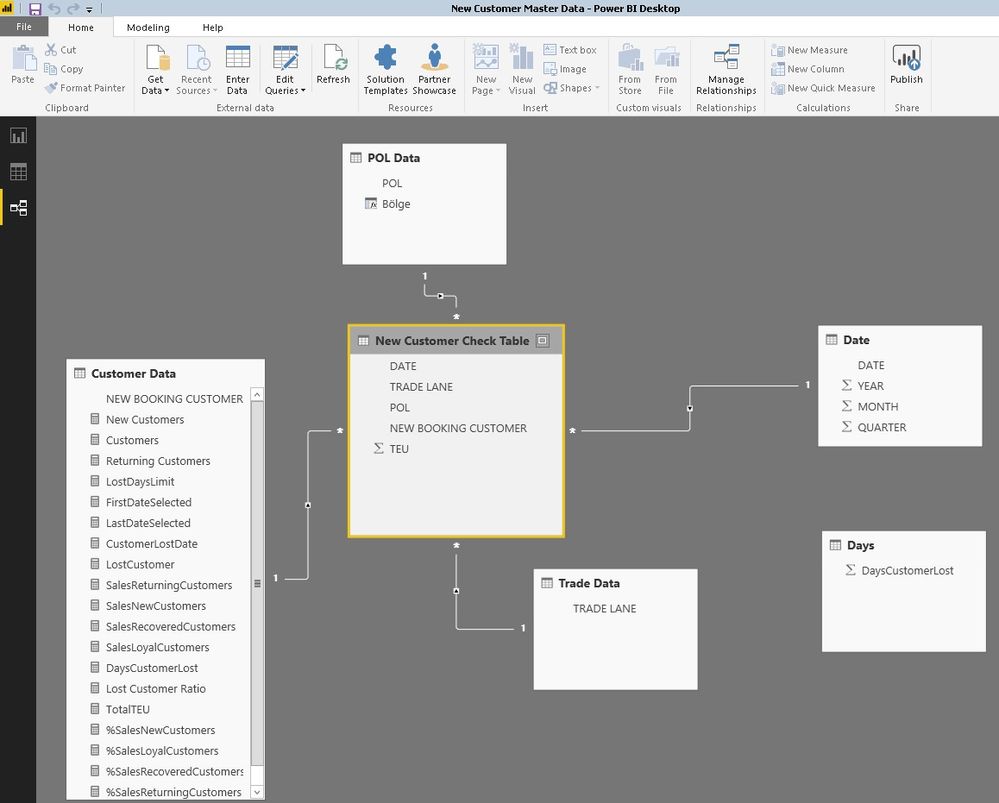
..added data relationship screenshot if needed.
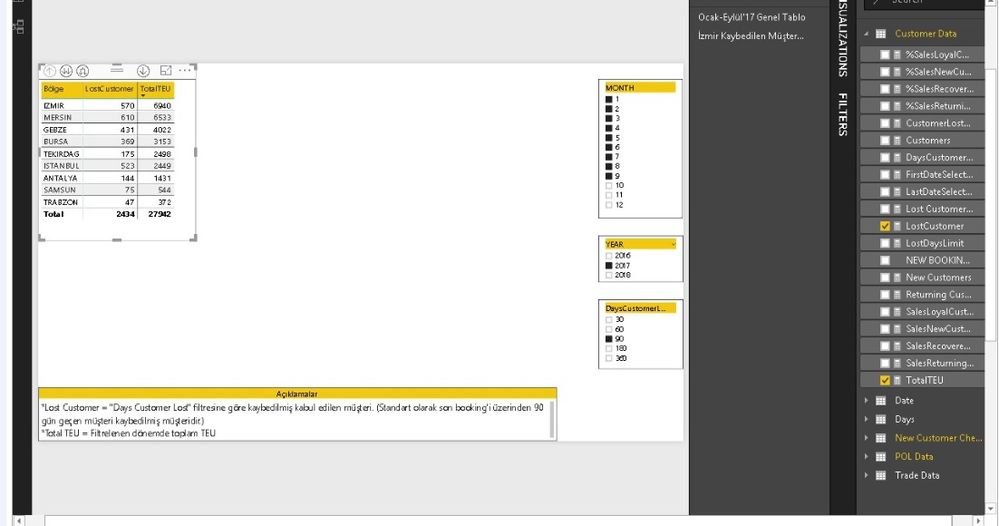
ss-1.jpgss-2.jpg


LostCustomer = SUMX(VALUES('Customer Data'[NEW BOOKING CUSTOMER]);IF('Customer Data'[CustomerLostDate]>=[FirstDateSelected] && 'Customer Data'[CustomerLostDate]<=[LastDateSelected];1))


FirstDateSelected = FIRSTDATE(DATEADD('Date'[DATE];0;MONTH))


LastDateSelected = LASTDATE(DATEADD('Date'[DATE];0;MONTH))


CustomerLostDate = CALCULATE(MAX('New Customer Check Table'[DATE]);CALCULATETABLE('New Customer Check Table';FILTER(ALL('Customer Data');'Customer Data'[NEW BOOKING CUSTOMER] = MAX('Customer Data'[NEW BOOKING CUSTOMER]));FILTER(ALL('Date');'Date'[DATE]<=MAX('Date'[DATE]))))+[LostDaysLimit]


LostDaysLimit = [DaysCustomerLost]+1


Thanks,

Caglar

2 REPLIES 2
v-ljerr-msft
Microsoft Employee
Microsoft Employee

Hi @Anonymous,


Where did you filter the regions, and which column is it? I cannot see it in your shared screenshots.


In addition, could you share a sample pbix file with just some mock data which can reproduce the issue, so that we can better assist on it? Smiley Happy


Regards

Anonymous
Not applicable

Hi @v-ljerr-msft,


I couldn't get same results with a mock .pbix file so i share the original one 🙂

POL refers to regions by the way,


here is the link,

 .pbix

https://drive.google.com/open?id=0B_SyDMpXEmrWamFHbGRfRDZLaFU

excel raw data

https://drive.google.com/open?id=0B_SyDMpXEmrWSFR5M2E2dWJpbGs


Thx,

Helpful resources

Announcements
Power BI DataViz World Championships

Power BI Dataviz World Championships

The Power BI Data Visualization World Championships is back! Get ahead of the game and start preparing now!

December 2025 Power BI Update Carousel

Power BI Monthly Update - December 2025

Check out the December 2025 Power BI Holiday Recap!

FabCon Atlanta 2026 carousel

FabCon Atlanta 2026

Join us at FabCon Atlanta, March 16-20, for the ultimate Fabric, Power BI, AI and SQL community-led event. Save $200 with code FABCOMM.